

What is a cron job?
A cron job is a task the server runs on a schedule. It works like an alarm clock. You say what to do and when. Then the server does it for you, again and again. People use cron jobs to clear old files, send reports or run a website's clean-up script.
Webuzo is a control panel that some hosting plans and VPS servers use to manage sites. It looks different from cPanel. Ask Hostvento support whether Webuzo is on your plan. Menu names can vary a little between versions.
Before you start
- Know the exact command you want to run.
- For PHP scripts, you usually need the path to PHP and the path to your script.
- Test the command by hand first if you can.
Steps
- Log in to Webuzo. Your welcome email has the address and login.
- Look for Cron Jobs in the menu. It may be under a heading such as Advanced or Server Utilities.
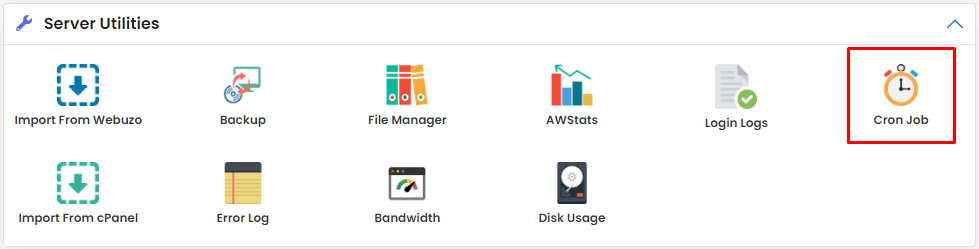
- Click Cron Jobs.
- Choose how often it should run, using the boxes for Minute, Hour, Day, Month and Weekday. You can also pick a common setting from a list, such as once a day.
- Type your command in the Command box. Here is an example:
This runs a PHP file called task.php. Replace the paths with your own./usr/bin/php /home/username/public_html/task.php - Click Add New Cron Job or Save.
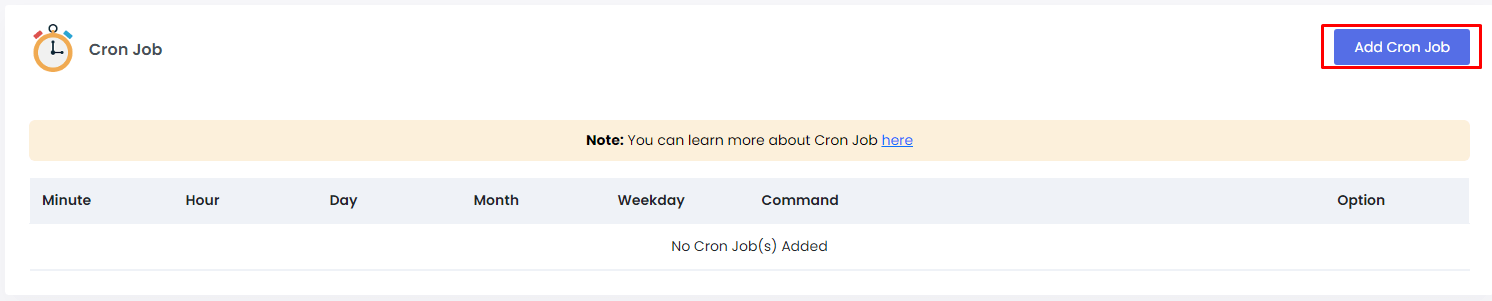
How the time boxes work
A star (*) means every. So * in all five boxes runs every minute. Here is a table.
| Setting | Meaning |
|---|---|
| 0 2 * * * | Every day at 2:00 AM |
| */15 * * * * | Every 15 minutes |
| 0 0 * * 0 | Every Sunday at midnight |
Tip: Do not run heavy jobs every minute. They can slow your site and your server.
Edit or remove a job
- Go back to Cron Jobs.
- Find the job in the list.
- Click the edit icon to change it, or the delete icon to remove it.
Quick recap
- A cron job runs a command on a schedule.
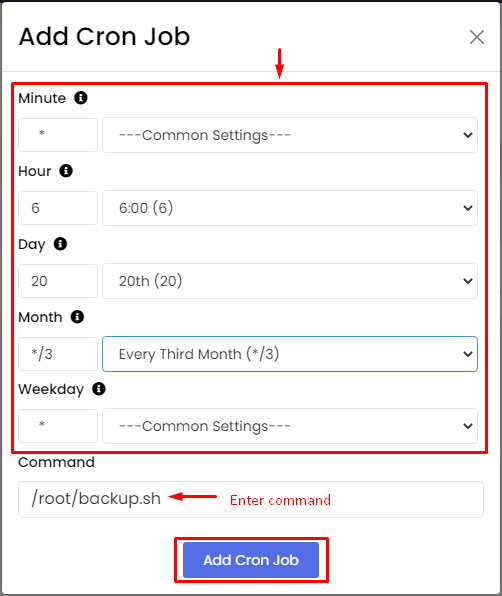
- In Webuzo, open Cron Jobs, set the time and type the command.
- Test the command first and avoid very frequent heavy jobs.