

What is a cron job?
A cron job is a task that the server runs on a timer. For example, it can run a script every night at midnight. Think of it as an alarm clock that starts a job by itself. Webuzo is a control panel, which is a web dashboard where you manage your hosting. Ask Hostvento support if Webuzo is on your plan. Menu names can differ slightly between versions.
Why delete one?
- The task is no longer needed.
- It runs too often and slows the server.
- It was added by mistake.
- It sends too many emails.
Before you delete
Deleting a cron job cannot be undone. Write down the command and the time settings first, or take a screenshot. Then you can add it back if you need to. Be careful: some cron jobs are needed by apps such as WordPress plugins or backup tools.
Steps
- Log in to Webuzo with your user account. Your welcome email has the login address.
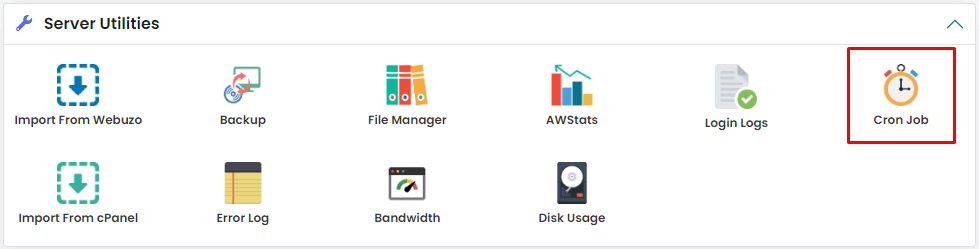
- Look for Cron Jobs in the menu. It may be under an Advanced or System heading.
- Click Cron Jobs. A list of your tasks appears.
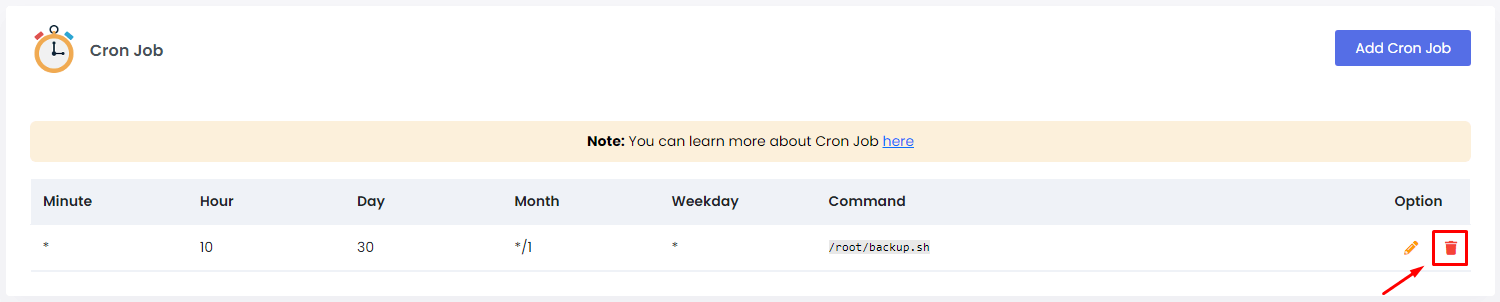
- Read each line. It shows the timing and the command.
- Find the job you want to remove.
- Tick the box beside it, or click the delete icon at the end of the row.
- If you ticked a box, click the Delete button.
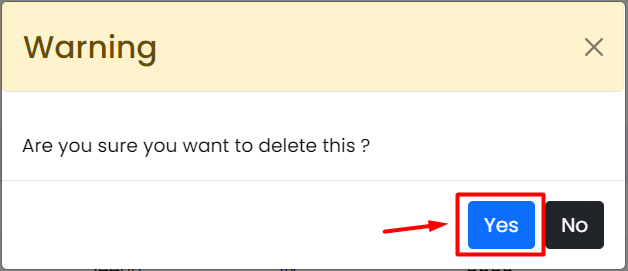
- Confirm when Webuzo asks.
- Check that the job has gone from the list.
Deleting with SSH
If you have SSH access, you can also do this by command. SSH is a safe way to type commands on a server from afar.
crontab -lThis lists your cron jobs.
crontab -eThis opens the list in an editor. Delete the line you do not want, then save and exit.
# at the start of its line in the editor. The server then ignores the line.Need help?
If you do not see the Cron Jobs page, open a support ticket.
Quick recap
- A cron job is a task that runs on a schedule.
- Note down the job before deleting it.
- Open Cron Jobs in Webuzo and use the delete option.
- Confirm that it is gone from the list.
- Deleting cannot be undone.