

What is a 301 redirect?
A redirect sends a visitor from one web address to another. A 301 redirect says the move is permanent. It is like a post office forwarding your mail when you move house. Search engines learn the new address and keep most of your ranking.
When do you need it?
- You moved to a new domain.
- You renamed or deleted a page.
- You want
wwwand non-wwwto go to one address. - You switched from HTTP to HTTPS.
Method 1: Using the control panel
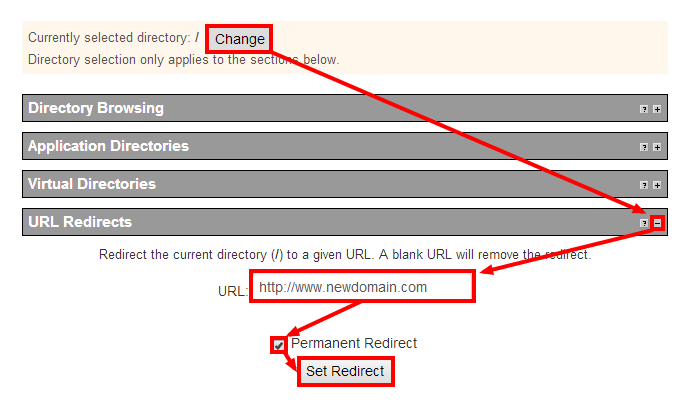
Many control panels have a redirect tool. Look for Redirects in the Domains section.
- Log in to your control panel. Your welcome email has the details.
- Open Redirects.
- Choose the type Permanent (301).
- Pick the domain, then type the old path.
- Type the full new address in the redirect box.
- Click Add.
Method 2: Using the .htaccess file
.htaccess is a settings file for the Apache web server. It sits in your site folder, often public_html. It works only on Apache servers.
First, make a backup copy. A mistake in this file can break your whole site.
- Open your file manager or an FTP program.
- Turn on the option to show hidden files, since the name starts with a dot.
- Open
.htaccess. If it does not exist, create it. - Add the line for the job you need, from the examples below.
- Save the file and test in a browser.
Redirect one page:
Redirect 301 /old-page.html https://www.example.com/new-page.htmlThis sends the old page to the new one.
Redirect a whole domain:
RewriteEngine On
RewriteCond %{HTTP_HOST} ^olddomain\.com$ [NC,OR]
RewriteCond %{HTTP_HOST} ^www\.olddomain\.com$ [NC]
RewriteRule ^(.*)$ https://newdomain.com/$1 [R=301,L]
These lines send every page of the old domain to the same page on the new domain. Replace the example names with yours.
Test it
- Open the old address in a private browser window.
- Check that you land on the new address.
Need help? Open a support ticket.
Quick recap
- A 301 redirect is a permanent forward.
- Use the control panel tool or .htaccess.
- Back up .htaccess before editing.
- Test in a private window.