

What is Cloudflare?
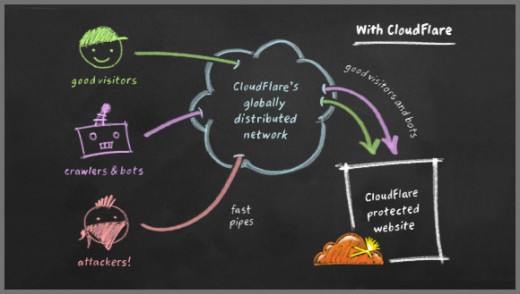
Cloudflare is a company that runs a huge network of servers around the world. A server is a powerful computer that stores websites. When you use Cloudflare, visitors talk to Cloudflare first. Cloudflare then talks to your hosting server. Think of it as a friendly doorman standing at the entrance of a shop.
Cloudflare is a third-party tool. It is not made by Hostvento. Ask Hostvento support if it is available on your plan.
Main features
CDN (faster pages)
CDN stands for Content Delivery Network. It keeps copies of your pictures and files on many servers across the world. A visitor gets the copy that is closest to them. This is like having small shops in many cities instead of one far away shop. Pages load faster.
DDoS protection
A DDoS attack is when bad computers send huge amounts of fake visits to knock a site offline. Cloudflare can spot this traffic and block it before it reaches your server.
Firewall
A firewall is a security guard for your site. It checks each visitor and blocks the ones that look harmful, such as bots that try to guess passwords.
Free SSL
SSL is a lock that scrambles data between your visitor and your site. It gives you the small padlock and https in the address bar. Cloudflare can help provide this lock.
DNS management
DNS is like a phone book for the internet. It turns a website name into a number that computers understand. Cloudflare can host your DNS records and answer quickly.
Caching and optimization
Caching means saving a ready-made copy of a page so it does not have to be built again. Cloudflare also has tools that make files smaller, so they download faster.
Analytics
You can see how many visits your site gets and how many threats were blocked.
Other tools
- Page rules to control how certain pages behave.
- An "Always Online" style option that can show a saved copy if your server is down.
- Bot management and rate limiting to slow down abusive visitors.
Some features are only on paid Cloudflare plans. Check Cloudflare's own plan page for details.
How to start
- Create an account on the Cloudflare website.
- Add your domain name to your Cloudflare account.
- Cloudflare shows you two nameservers. These are addresses that tell the internet where your DNS lives.
- Log in to the client area and open Domains.
- Change the nameservers of your domain to the ones Cloudflare gave you.
- Wait some hours. The change can take time to spread.
Quick recap
- Cloudflare stands between your visitors and your server.
- It gives you a CDN, security, SSL, DNS and caching.
- You start by changing your domain's nameservers.
- Ask Hostvento support whether it works with your plan.