What does deploy mean?
To deploy means to move your app from your computer to a server so everyone can use it. Node.js runs JavaScript on a server. Root is the main admin account on the server.
Steps
- Connect to your server with SSH as root.
- Add the Node.js package source. This example uses version 16, the last that works well on CentOS 7:
curl -fsSL https://rpm.nodesource.com/setup_16.x | bash -This tells the system where to find Node.js packages.
- Install Node.js:
yum install -y nodejsThis installs Node.js and npm. npm is the tool that downloads code libraries.
- Check the install:
node -vThis prints the version number.
- Upload your project to a folder such as
/var/www/myapp. You can use SFTP or git. - Go into the folder and install the libraries:
cd /var/www/myapp
npm install
This reads package.json and downloads what your app needs.
- Install PM2. It keeps your app running, even after a crash or restart:
npm install -g pm2This installs PM2 for the whole system.
- Start your app:
pm2 start app.js --name myappThis runs app.js in the background.
- Make PM2 start on boot:
pm2 startup
pm2 save
This saves your list of apps and restarts them after a reboot.
- Open the port in the firewall. Replace 3000 with the port your app uses:
firewall-cmd --permanent --add-port=3000/tcp
firewall-cmd --reload
A port is like a numbered door on the server. This opens door 3000.
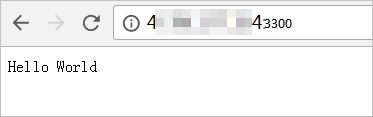
- Visit
http://your-server-ip:3000in your browser.
Use a normal web address
Most people put a web server such as Nginx in front of the app. It listens on port 80 and passes visits to your app. This lets visitors use your domain name without a port number.
For help with your server details, check your welcome email or open a support ticket.
Quick recap
- Install Node.js with the NodeSource script and yum.
- Upload your project and run
npm install. - Use PM2 to keep the app running.
- Open the port, or put Nginx in front.