

What is a disk space limit?
Disk space is the storage on the server where files, emails and databases live. A limit, also called a quota, is a cap on how much one account can use. It works like a school locker. Each student gets one locker of a fixed size, so no one fills the whole hallway.
Webuzo is a control panel, which is a web page for managing a server. Webuzo uses plans. A plan is a saved set of limits that you give to users. The disk limit usually lives inside the plan.
Screens may look a little different between Webuzo versions. Use the names below as a guide and look for similar words.
Before you start
You need the admin login of Webuzo. It is in your welcome email. Changing a limit to a value below the space already used can block the user from saving new files. Check the current use first.
Steps: Edit the plan
- Log in to the Webuzo admin panel.
- Open the Plans section in the menu.
- Choose the plan the user is on and click edit.
- Find the field called Disk Space.
- Type the new size. Check whether the box counts in MB or GB.
- Click Save.
Steps: Create a new plan
- In Plans, click the button to add a new plan.
- Give it a name, such as "Small".
- Set the Disk Space value and the other limits.
- Save it.
- Open the list of users, edit your user and pick the new plan.
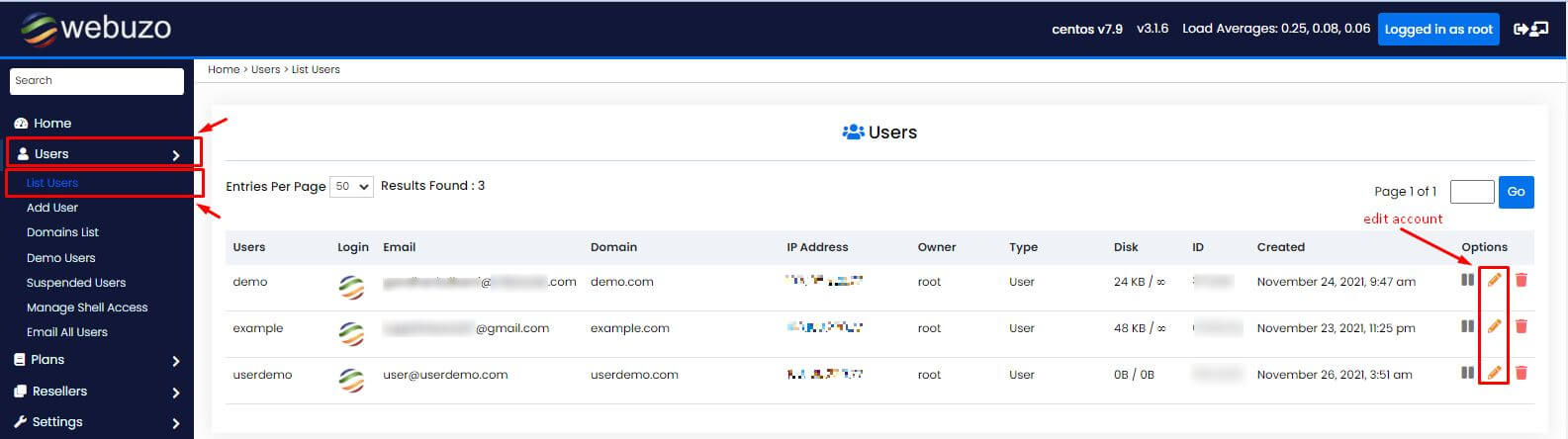
Check the result
- Open the user list in the admin panel.
- Look at the disk usage next to the account.

- Make sure the new limit is shown.
Not sure if Webuzo is on your plan? Ask Hostvento support at https://secure.hostvento.com/submitticket.php.
Quick recap
- A disk limit caps the storage one account can use.
- In Webuzo the limit is set inside a plan.

- Edit the plan or create a new one, then assign it to the user.
- Do not set the limit below the space already used.