

What does this error mean?
Moodle is a free tool for running online courses. It stores its data in a database, which is an organised store of information. UTF-8 is a text format that can hold letters from every language, plus symbols and emoji. Moodle needs the database to use UTF-8. If the database was made with another format, the installer stops with a "Unicode format UTF-8" message.
Warning: The fix below can change a database. If it already holds data, take a backup first. A fresh, empty database is safest.
Fix 1: Create a new database with UTF-8
This is the easiest way when Moodle is not installed yet.
- Log in to your hosting control panel.
- Open MySQL Databases or MySQL Database Wizard.
- Create a new database and a new database user.
- Add the user to the database with all privileges.
- Open phpMyAdmin, which is a web tool to manage databases.
- Click your new database. Then click the Operations tab.
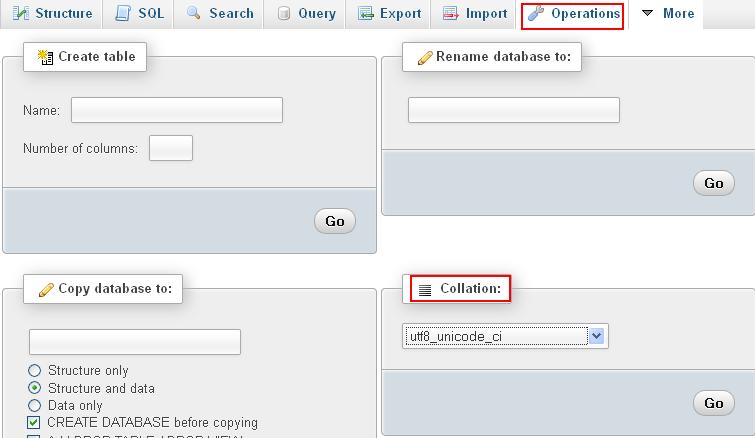
- Find Collation. Choose utf8mb4_unicode_ci. If you do not see it, choose utf8_general_ci.
- Click Go.
Collation is the rule set that decides how text is stored and sorted.
Fix 2: Check the database type in config.php
Moodle has a settings file called config.php. Open it in the File Manager and look at these lines:
$CFG->dbtype = 'mysqli';
$CFG->dbname = 'your_database_name';
$CFG->dbuser = 'your_database_user';
Make sure the name, user and password match the new UTF-8 database. If you use MariaDB, the type may be mariadb.
Try the installer again
- Open your Moodle address in the browser.
- Go through the installer steps again.
- Enter the details of the new database when asked.
- Continue to the end.
Quick recap
- Moodle needs its database to use UTF-8.
- The error appears when the database uses another text format.
- Make a new database and set its collation to utf8mb4_unicode_ci.
- Match the details in
config.phpand run the installer again. - Back up any database that already has data.