

Note: This guide needs root access to the server and WHM. VPS and dedicated server customers have it. Shared hosting accounts do not.
What is it?
A process is a program that is running on the server. Some processes keep running in the background after they are no longer needed. They use memory and slow the server down.
WHM is the admin panel for cPanel servers. Its Background Process Killer tool ends certain processes on a schedule. It is like a night cleaner who turns off lights someone forgot.
The tool checks for processes that belong to normal users and match names on a list. The server then stops them.
Warning: Stopping the wrong process can break a customer's job. Check the list before you save. Do not add processes that your websites need.
Steps
- Log in to WHM as root. The address usually looks like
https://your-server-ip:2087. - Type
Background Process Killerin the search box at the top left. - Click Background Process Killer.
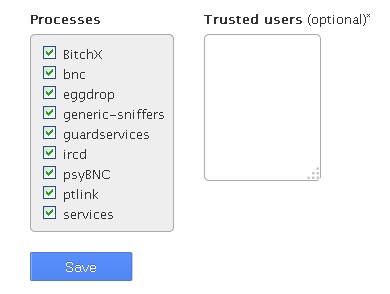
- You will see a list of process names, each with a tick box.
- Tick the processes you want the server to end automatically. Common examples are old, stuck ones that users start in a shell.
- Untick the ones you want to leave alone.
- To add a name, use the box provided and type the process name exactly as it appears. This is only for names that are safe to stop.
- Click Save.
Check it later
- In WHM, open Process Manager.
- Look at what is running.
- If a good program keeps getting killed, go back and untick it.
When to use it
- Your server slows down for no clear reason.
- Many leftover processes pile up.
- Users run stuck shell programs.
Tip: Option names can vary slightly between cPanel versions. If a label looks different, look for the same idea.
Quick recap
- You need root access and WHM.
- Open Background Process Killer.
- Tick processes to end and untick ones to keep.
- Click Save.
- Watch the server to be sure nothing needed gets stopped.