

What are SSH and ports?
SSH is a safe way to type commands on a server from your own computer. A port is like a numbered door on your server. Each service uses one door. SSH normally uses door 22. Attackers know this, so they keep knocking on it. Moving SSH to a different door cuts down on this noise. It is not full protection, so you should still use strong passwords or SSH keys.
Warning: A mistake can lock you out. Keep your current SSH window open until you test the new port in a second window. Also ask Hostvento support if your plan has an outside firewall that needs the new port opened.
Steps
- Pick a new port number between 1024 and 65535. For example, 2222. Do not pick a port another service uses.
- Log in to your server with SSH.
- Open the SSH settings file.
sudo nano /etc/ssh/sshd_config - Find the line
#Port 22. Remove the#and change the number.Port 2222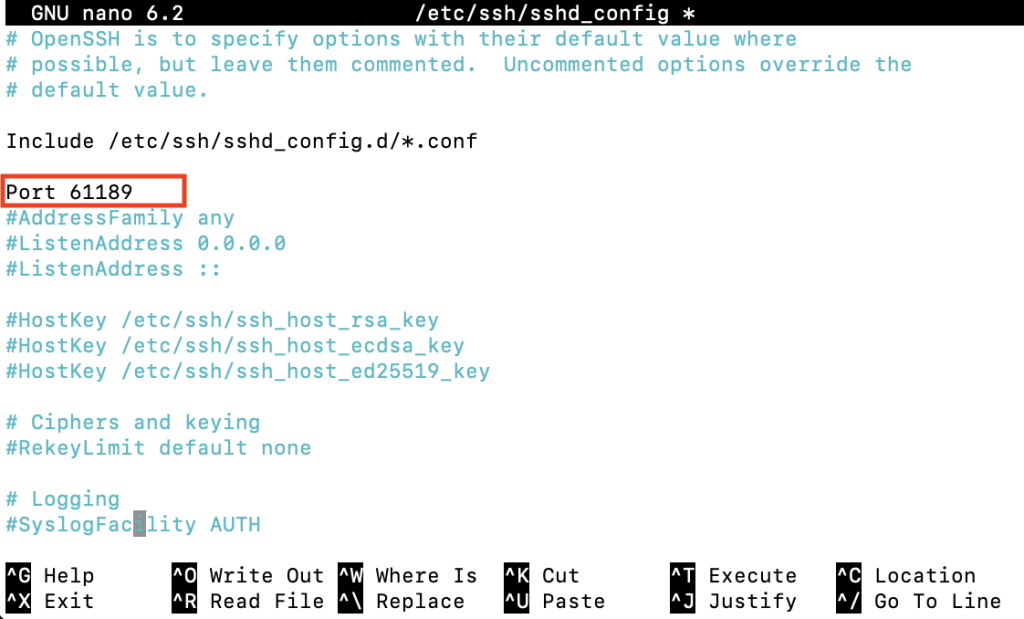
- Save the file. In nano, press
Ctrl+O,Enter, thenCtrl+X. - Open the new port in your firewall. A firewall is a guard that decides which doors stay open. Use the command for your system.
That one is for Ubuntu with UFW. On CentOS with firewalld, usesudo ufw allow 2222/tcpsudo firewall-cmd --permanent --add-port=2222/tcpand thensudo firewall-cmd --reload. - On CentOS with SELinux on, tell it about the new port.
sudo semanage port -a -t ssh_port_t -p tcp 2222 - Restart SSH.
On Ubuntu the service may be namedsudo systemctl restart sshdssh. - Do not close your first window. Open a new window and test.
ssh -p 2222 username@your-server-ip - If it works, you may close the old window. You can later close port 22 in the firewall.
If it fails
- Use your still-open window to undo the change.
- Check that the firewall allows the new port.
- Contact Hostvento support if you are locked out.
Quick recap
- Edit
/etc/ssh/sshd_configand set a newPort.
- Open the port in the firewall first.

- Restart SSH and test in a new window.
- Connect with
ssh -pfrom now on.