

What is GTmetrix?
GTmetrix is a free website tool. It loads your page and tells you how fast it is. It also lists what slows it down. Magento is an online store platform. Stores are heavy, so testing helps a lot.
Step 1: Run a test
- Open the GTmetrix website.

- Paste the address of your store page into the box.
- Pick a test location close to your customers, if the tool lets you.
- Click Test your site.
- Wait for the report.
- Test your home page, a category page and a product page. Write down each score.
Step 2: Read the report
- Grade: A letter score for your page.

- Largest Contentful Paint: How long the main part takes to show.
- Total page size: How much data the page downloads.
- Requests: How many files the page asks for.
- Waterfall: A chart showing each file and how long it took.
Look at the Structure and Waterfall areas. They show the slowest items.
Step 3: Fix common issues in Magento
- Turn on caching. Go to System, then Cache Management. Make sure all cache types are enabled. Full Page Cache saves ready-made pages.
- Merge and minify files. In Magento 2, go to Stores, then Configuration, then Advanced, then Developer. In JavaScript Settings and CSS Settings, enable minify and merge. Test your store after, because bundling can break some pages. This section may be hidden in production mode.
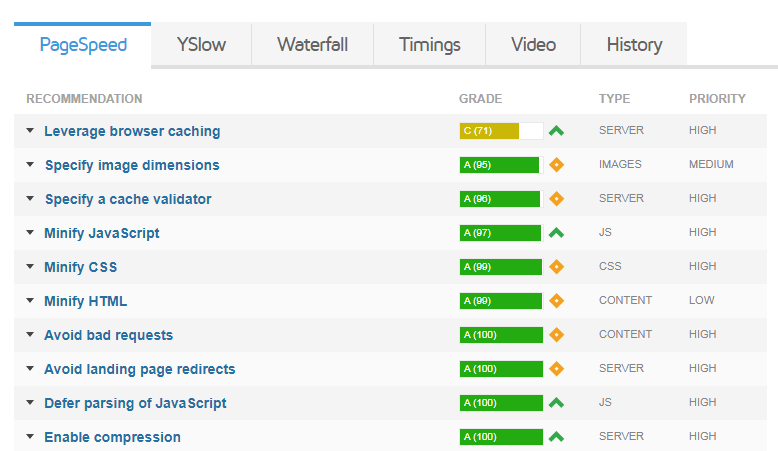
- Shrink images. Compress product photos before you upload them. Use sizes that fit the page.
- Enable compression. Ask Hostvento support if Gzip is on for your account.
- Set browser caching. Add expiry rules in
.htaccessto tell browsers to keep static files. - Remove unused extensions. Each one adds code to every page.
- Use a CDN. A CDN serves files from a server near the visitor.
- Update PHP and Magento. Newer versions are faster and safer.
Tip: Make a backup before you change settings. Change one thing, retest, and compare.
Step 4: Test again
- Run GTmetrix on the same pages.
- Compare the numbers with your notes.
- Keep the changes that helped.
If your server itself is slow, no store setting can fix that. In that case open a support ticket and share your report.
Quick recap
- GTmetrix tests speed and finds the causes of slowness.
- Test several page types and note your scores.
- Enable caching, minify files, shrink images and trim extensions.
- Back up first and retest after each change.