

Why does the timezone matter?
PHP is a language that many websites use. When it shows a date or time, it needs to know where in the world you are. Without that, a blog post may show a time that is hours off. The php.ini file is a text file with PHP's settings. The timezone setting lives there.
Steps
Take a backup copy of php.ini before you change it.
- Log in to your hosting control panel.
- Open the File Manager.
- Go to your website folder, often
public_html. - Find
php.ini. If it does not exist, create a new file with that name. - Right-click the file and choose Edit.
- Look for a line that starts with
date.timezone. It may have a semicolon at the start. A semicolon means the line is switched off. - Remove the semicolon and set your timezone. If the line is missing, add it:
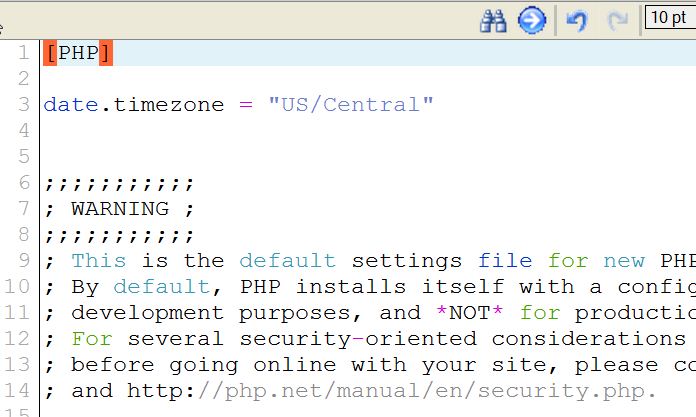
date.timezone = "Asia/Kolkata"This sets the timezone to India time. Use the name of your own city or region.
- Click Save Changes.
How to find the right name
PHP uses names like Region/City. Here are a few examples:
America/New_YorkEurope/LondonAsia/DubaiAustralia/Sydney
PHP has a full list in its official manual. Search for "PHP list of supported timezones".
Check that it works
- Create a file named
time.phpin your website folder. - Put this inside it:
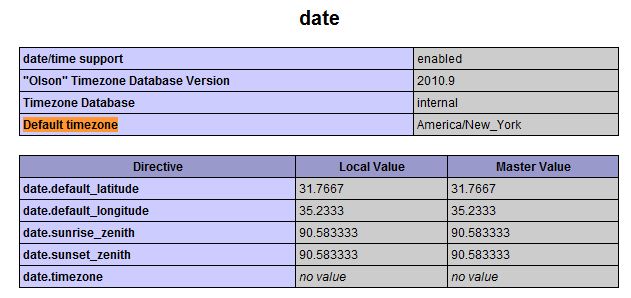
<?php echo date_default_timezone_get(); ?>This prints the timezone PHP is using now.
- Open
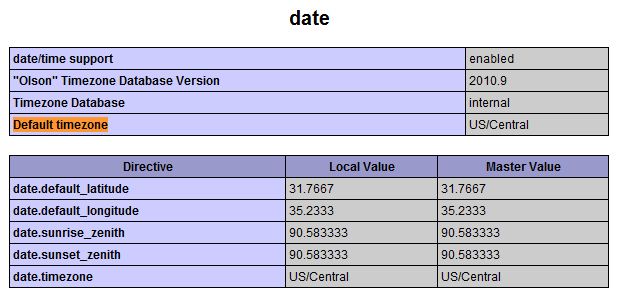
yourdomain.com/time.phpin your browser. - Check that the name matches what you set.
- Delete
time.phpwhen you are done.
Tip: If you cannot edit php.ini on your plan, look for a PHP settings or PHP selector tool in your control panel. You can also ask Hostvento support.
Quick recap
- PHP needs a timezone to show the right time.
- Set
date.timezonein php.ini. - Use the
Region/Cityformat. - Test with a small file, then delete it.