

What is happening here?
Root is the all-powerful user on a Linux server. If you forget its password, you can still reset it. You restart the server and stop it during the boot menu. Then you open a small repair shell and set a new password. You must be at the server's console, not on SSH, because SSH needs the password you lost. Your VPS panel or the Hostvento client area at the client area may offer a console. If not, ask support.
Warning: follow the steps exactly. Take a snapshot or backup first if your plan allows it.
Steps
- Open the server console.
- Restart the server. Use the reboot option in your panel, or send Ctrl + Alt + Del.
- When the boot menu (called GRUB) appears, press e on the first entry to edit it. Be quick, as it only waits a few seconds.
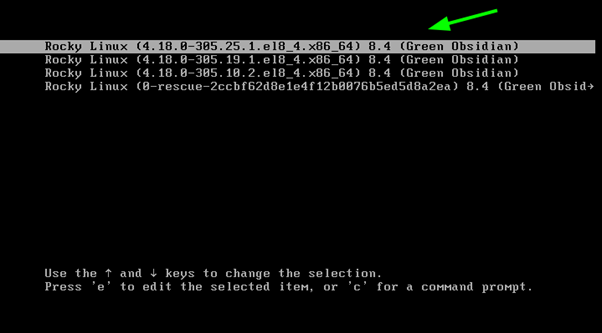
- Find the line that begins with
linux. Use the arrow keys to go to its end. - Add this at the end of the line, after a space:
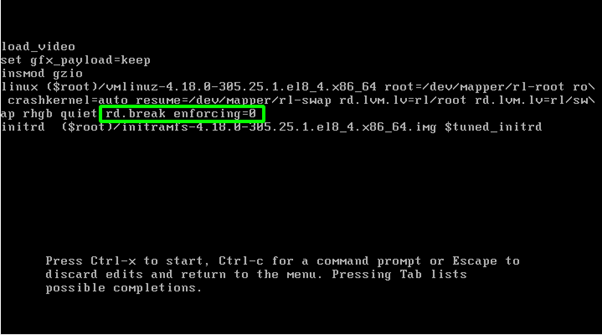
rd.breakThis stops the boot early, before the full system starts.
- Press Ctrl + X to boot with the change.
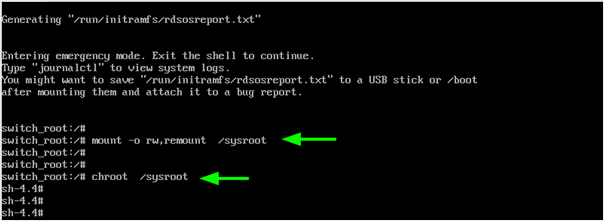
- A shell prompt appears. Make the system disk writable:
mount -o remount,rw /sysroot- Switch into the real system:
chroot /sysroot- Set a new password:
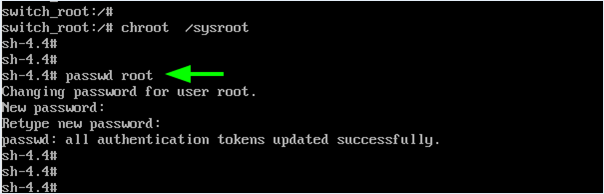
passwd rootType the new password twice. Nothing shows while you type. That is normal.
- Tell the system to relabel files at next boot. SELinux is a security guard that needs this:
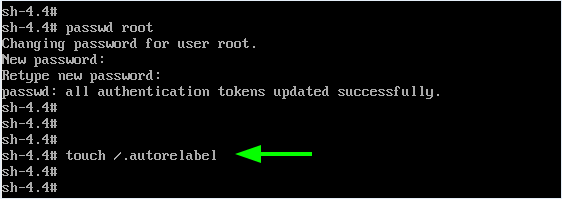
touch /.autorelabel- Leave the shell, twice:
exit
exit- The server reboots. The first boot is slow because it relabels files. Let it finish.
- Log in as root with your new password.
Tip: Some VPS panels have a built-in password reset button. Look there first, or ask Hostvento support. Store your new password in a password manager.
Quick recap
- You need the server console, not SSH.
- Edit the boot entry and add
rd.break. - Remount, chroot, run
passwd root. - Create
/.autorelabeland reboot.