

What is Varnish?
Varnish is a program that sits in front of your website. It keeps a copy of each page it has already built. When the next visitor asks for that page, Varnish hands over the copy at once. Think of a baker who keeps fresh bread on the counter instead of baking a new loaf for every customer.
Magento is a popular online shop program. Magento 2 can talk to Varnish, but you must turn this on.
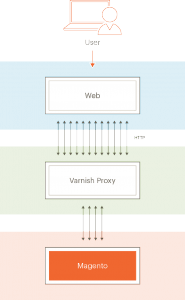
Before you start: Varnish must already be installed on your server. If it is not, ask Hostvento support. Take a backup of your store and your server settings first. A wrong setting can make your shop show errors.
Steps
- Log in to your Magento 2 admin panel. This is the back office of your shop.
- Click Stores in the left menu.
- Under Settings, click Configuration.
- Open Advanced and click System.
- Open the section named Full Page Cache.
- In Caching Application, untick the box Use system value.
- Choose Varnish Cache from the list.
- Open Varnish Configuration. Check the host and port. The host is the address of your Varnish server. The port is the door number it listens on. Common defaults are shown in the form, but your server may differ.
- Click Save Config.
- Click one of the Export VCL buttons. Pick the one that matches your Varnish version. This downloads a file called
varnish.vcl. VCL is the rule book that tells Varnish how to behave. - Upload that file to your server, for example into
/etc/varnish/. - Log in to your server over SSH as root. SSH is a safe way to type commands on a server from afar.
- Restart Varnish so it reads the new rules:
systemctl restart varnishThis command stops Varnish and starts it again.
- Back in the admin panel, go to System, then Cache Management. Click Flush Magento Cache.
Check that it works
Open your shop in a browser. Reload a page twice. You can look at the page headers with a tool such as the browser developer tools. A header named X-Varnish shows that Varnish handled the request.
Tip: Varnish only caches plain HTTP traffic. Many servers put a tool in front of it to handle HTTPS, the secure version. Ask Hostvento support how your server is set up.
Quick recap
- Varnish keeps copies of pages so your shop is quicker.
- In Magento go to Stores, Configuration, Advanced, System, Full Page Cache.
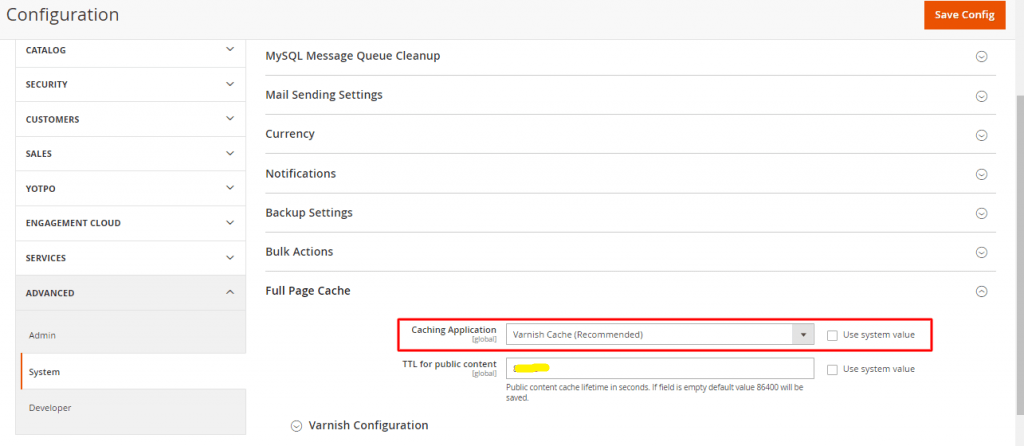

- Choose Varnish Cache and save.
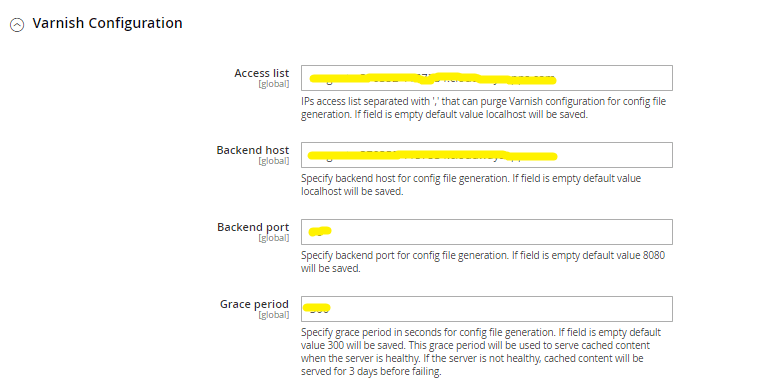
- Export the VCL file, put it on the server and restart Varnish.
- Flush the Magento cache and test your pages.