

What is a landing page?
A landing page is a page made for one job. Visitors arrive, read a short message, and do one thing. That one thing could be to sign up, call you or buy a product. It is like a shop window with one clear sign.
Steps
- Log in to your WordPress dashboard. The dashboard is the private control room of your site.
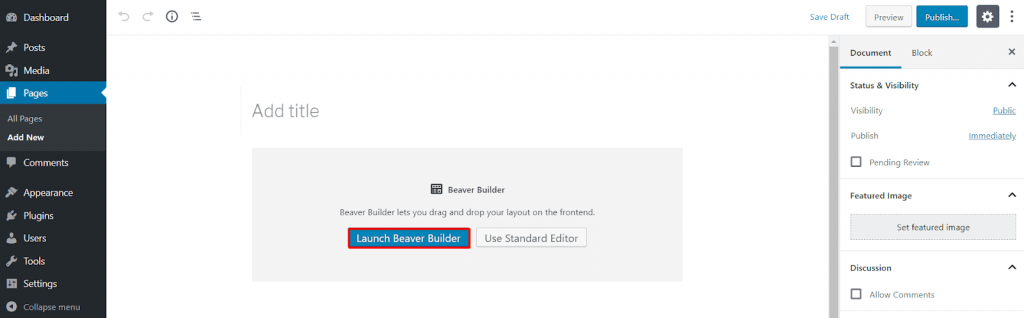
- In the left menu, click Pages.
- Click Add New.
- Type a title at the top. Use words that explain the offer.
- Click the + button to add a block. A block is one piece of the page, such as a heading, a picture or a button.
- Add a Heading block. Write one short, strong sentence.
- Add a Paragraph block. Write two or three short lines about what the visitor gets.
- Add an Image block. Upload a clear picture that fits your message.
- Add a Buttons block. Type the action, like "Sign up now". Paste the link the button should open.
- Look at the right-hand panel. Open the Page settings. If your theme offers a template with no sidebar, or a full-width template, choose it under Template. This hides menus and side boxes that may distract visitors.
- Click Preview to see how it looks on a computer and a phone.
- Click Publish.
Make it your home page (optional)
- Go to Settings, then Reading.
- Choose A static page.
- Pick your new page next to Homepage.
- Click Save Changes.
What makes a good landing page?
- One goal only.
- Short text with a big heading.
- A button that is easy to see.
- Few links that lead away from the page.
Tip: Some themes and page builder plugins have ready-made landing page designs. Menu names can differ from theme to theme, so look in your theme's options.
Quick recap
- A landing page has one clear goal.
- Go to Pages, then Add New.
- Add a heading, short text, a picture and a button.
- Pick a full-width template if your theme has one.
- Preview, then click Publish.