

What is Dolphin?
Dolphin is software for building a social or dating community site. Each member has a profile page. This page is like a personal card. It shows a name, photo, age and interests. As the site owner, you can change which pieces show up and in what order.
Dolphin 7 is the version most people know. Menu names may differ a little in other versions.
Warning: Changes to profile pages affect every member. Take a backup of your files and database before you start.
Change the fields members fill in
A field is one box on a form, such as "City" or "About me".
- Log in to the Dolphin admin panel. The address is your site plus
/administration. - Open the Builders menu.
- Click Profile Fields.
- Pick the form you want to edit, for example the join form or the profile view.
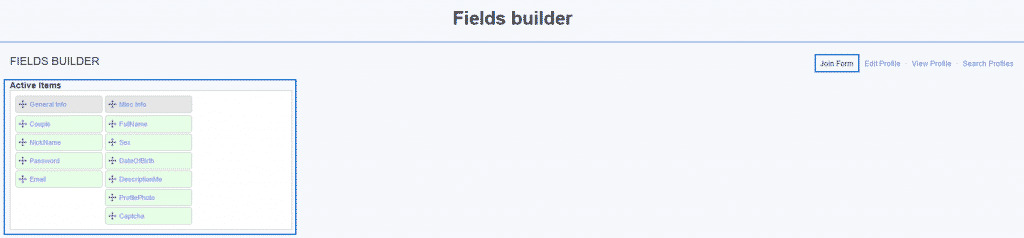
- To add a field, drag it from the list of unused fields into a block. To remove one, drag it out.
- Click a field to change its name, type and rules, such as whether members must fill it in.
- Click Save.
Change the layout of the profile page
- In the Builders menu, click Pages Builder.
- Choose the page called Profile (the profile view page).
- You see columns with blocks. A block is a box such as photos, friends or description.
- Drag a block to a new column to move it.
- Click the small icon on a block to edit its title or turn it off.
- To add a block, pick one from the list of unused blocks and drag it in.
- Click Save or Apply.
Check your work
- Open your site in another browser tab.
- Log in as a member, or view an existing profile.
- Reload the page. If you still see the old layout, clear the Dolphin cache in the admin panel, or clear your browser cache.
Change who sees what
Members can often choose who sees parts of their profile. You can also control access with membership levels. A membership level is a group of members who share the same rights. Look for Memberships in the admin panel.
Tip: Test every change with a test account, not with a real member's page. If something breaks, restore your backup or ask Hostvento support.
Quick recap
- Profile fields are the boxes members fill in. Edit them in Profile Fields.
- The page layout is edited in Pages Builder.
- Drag blocks and fields to move them.
- Click Save, then reload to check.
- Back up before you start.