

What is a database user?
A database is a store where your website keeps information. A database user is a login for that store. It is like a key card with its own name and password. Without it, your website cannot open its data.
Webuzo is a control panel. A control panel is a web page where you manage your hosting. Ask Hostvento support if Webuzo is on your plan.
Before you start
- Create the database first. You attach the user to it later.
- Think of a strong password. Mix letters, numbers and symbols.
Steps
- Log in to your Webuzo panel. Your welcome email has the address and login.
- Look for the Database section. Click Database Manager or the MySQL option.

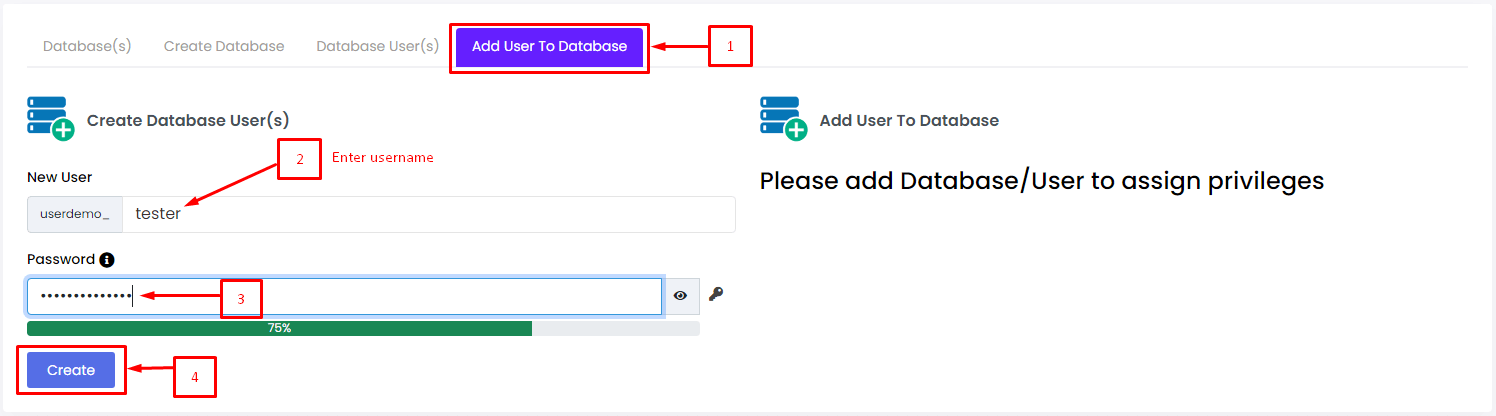
- Find the section for users. It may be named Add Database User or Database Users.
- Type a user name. Short and simple names work best.
- Type a password. Type the same password again to confirm.
- Click Add User or Create.
- Look for a success message.
Tip: Menu names change between Webuzo versions. If you cannot find an item, use the search box in the panel, or ask support.
Give the user access to a database
A new user cannot do anything yet. You must link it to a database.
- In the same Database area, find a place to set Privileges or to Add User to Database.
- Choose the user from the list.
- Choose the database from the list.
- Tick All Privileges if the website needs full control. Most apps like WordPress need this.
- Click Add or Save.
Use the details in your website
Your app will ask for four things. Write them down.
- Database name
- User name
- Password
- Host, which is often
localhost
The host is the address of the database computer. localhost means the same computer as your website.
Quick recap
- A database user is a login for a database.
- Create it in the Database area of Webuzo.
- Link it to a database and give it privileges.
- Keep the name, password and host safe for your website.