

What is a database?
A database is a store where a website keeps its information. A blog keeps posts and comments in it. A shop keeps products and orders. Think of it as a big, tidy filing cabinet.
Webuzo is a control panel. A control panel is a web page where you manage your hosting. Ask Hostvento support if Webuzo is on your plan.
Steps
- Log in to your Webuzo panel. Your welcome email has the address and login details.
- Find the Database section.
- Click Database Manager, or the MySQL option that looks like it.
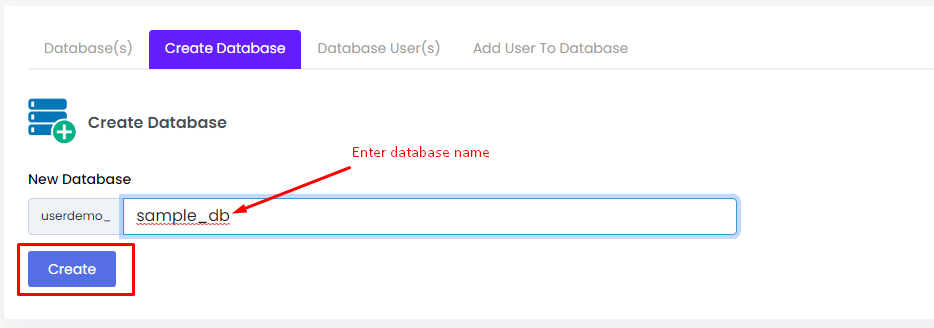
- Look for Add Database or Create Database.
- Type a name for the database. Use small letters, numbers and underscores. Do not use spaces.
- Click Add Database or Create.

- Check the list. Your new database should now appear.
Next: make a user
An empty database is not ready yet. Your website needs a login to open it. That login is called a database user.
- In the Database area, create a user with a name and a strong password.
- Link that user to the new database.
- Give the user All Privileges. Most apps, such as WordPress, need this.
The guide on creating a database user in Webuzo shows these steps in more detail.
What to write down
- The database name
- The user name
- The password
- The host, often
localhost
The host is the address of the database computer. localhost means the same computer as your site. You will enter all four when you install an app.
If you cannot create it
Your plan may have a limit on the number of databases. Delete one you no longer use, or ask Hostvento support. Open a support ticket if needed.
Quick recap
- A database stores your website's information.
- Create it in Database Manager in Webuzo.
- Add a user, link it, and give it privileges.
- Save the name, user, password and host.