

What is Remote MySQL?
A database stores your site's data. Normally only your own site on the same server can talk to it. Remote MySQL lets a computer elsewhere talk to it too. Think of it as a guest list for a party. Only addresses on the list get in.
Each computer has an IP address. It is a number that names a device on the internet, like a home address. You add the IP address of the computer you trust.
Before you start
- You need a database and a database user. They must already exist.
- Find the IP address of the computer or server that will connect. Search "what is my IP" on that computer.
- Only add addresses you trust. Each one is a door into your data.
Steps
- Log in to your client area. Open your hosting service and log in to cPanel.
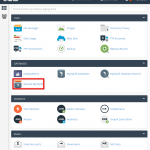
- Under Databases, click Remote MySQL (it may be called Remote Database Access).
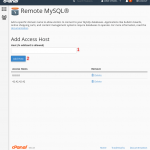
- Find the box named Host.
- Type the IP address of the computer that will connect.
- Click Add Host.
- Check that the address now shows in the list of allowed hosts.
The computer can now try to connect. It still needs the database name, user name and password.
What to use when connecting
- Host: the server name from your welcome email, or your domain name. Ask support if unsure.
- Port: usually 3306. This is the standard door number for MySQL.
- User and password: the ones you made in MySQL Databases.
Tip: The percent sign (%) is a wildcard that allows any address. Do not use it unless you really must. It is not safe.
If it does not work
- Check that the IP address is typed correctly.
- Your home or office IP may change. Check it again.
- The server firewall may block port 3306. A firewall is a guard that blocks unknown visitors. Ask Hostvento support if remote access is allowed on your plan.
You can open a support ticket for help.
Quick recap
- Remote MySQL lets approved computers reach your database.
- Open cPanel, click Remote MySQL, add the IP, click Add Host.
- Only add addresses you trust.
- Avoid the % wildcard.
- Ask support if the connection still fails.