

What is a database user?
A database holds your site's data. A database user is an account that is allowed to open it. It has a name and a password. Think of it as a key. You can give each app or person their own key, and decide what each key can do.
Steps in cPanel
cPanel is the control panel for your hosting account.
- Log in to your client area. Open your hosting service and log in to cPanel.
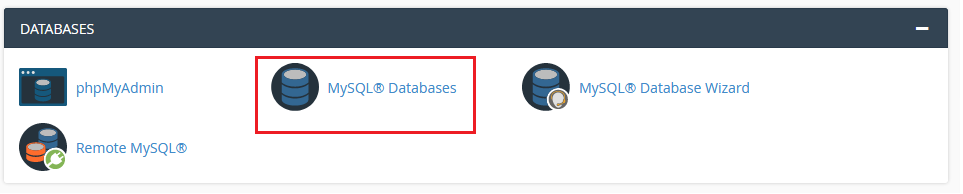
- Under Databases, click MySQL Databases.
- Scroll to MySQL Users and find Add New User.
- Type a user name. cPanel adds your account name in front of it.
- Type a strong password. Use the Password Generator button if you like. Save the password in a safe place.
- Click Create User.
The user exists now. But it cannot open any database yet. You must link it to one.
Add the user to a database
- Scroll down to Add User To Database.
- Choose the user from the first list.
- Choose the database from the second list.
- Click Add.
- A page of privileges opens. Privileges are the actions the user may do, such as reading or deleting data.
- Tick ALL PRIVILEGES if the user needs full control. For a limited user, tick only some boxes.
- Click Make Changes.
Steps with a command
If you manage your own server, you can use SQL. This needs an admin account.
CREATE USER 'newuser'@'localhost' IDENTIFIED BY 'StrongPassword';
GRANT ALL PRIVILEGES ON dbname.* TO 'newuser'@'localhost';
FLUSH PRIVILEGES;
The first line makes the user. The second gives it rights on the database named dbname. The third reloads the rights.
Tip: Give each website its own user. Give only the privileges it needs. This limits the damage if a password leaks.
Quick recap
- A database user is a key to a database.
- In cPanel, use MySQL Databases, then Create User.
- Then use Add User To Database and pick privileges.
- Use a strong password and save it safely.
- Ask Hostvento support if you get stuck.