

Why copy a database?
A database is the place where your site keeps its data. A copy is useful when you want to test changes safely, or build a second version of your site. The original stays untouched. phpMyAdmin is a web tool for managing databases. You open it from cPanel, your hosting control panel.
Before you start
You need a new, empty database to hold the copy.
- Log in to your client area. Open your hosting service and log in to cPanel.
- Under Databases, click MySQL Databases.
- Under Create New Database, type a name and click Create Database.
- Add a user to the new database if the copy will be used by a site. See our guide on adding database users.
Copy using the Operations tab
- Go back to cPanel and open phpMyAdmin.

- Click the database you want to copy, in the left list.
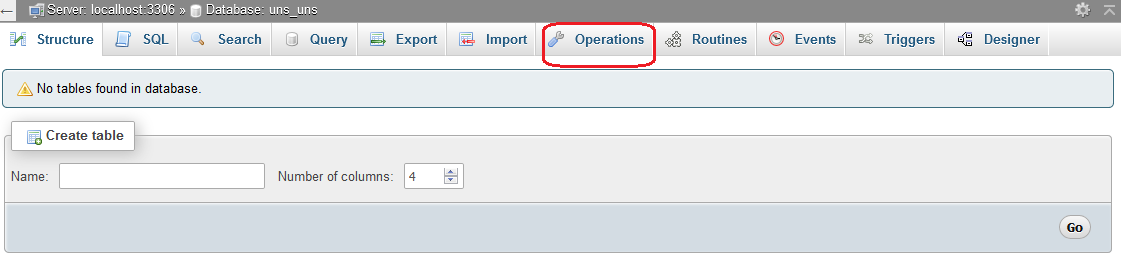
- Click the Operations tab.
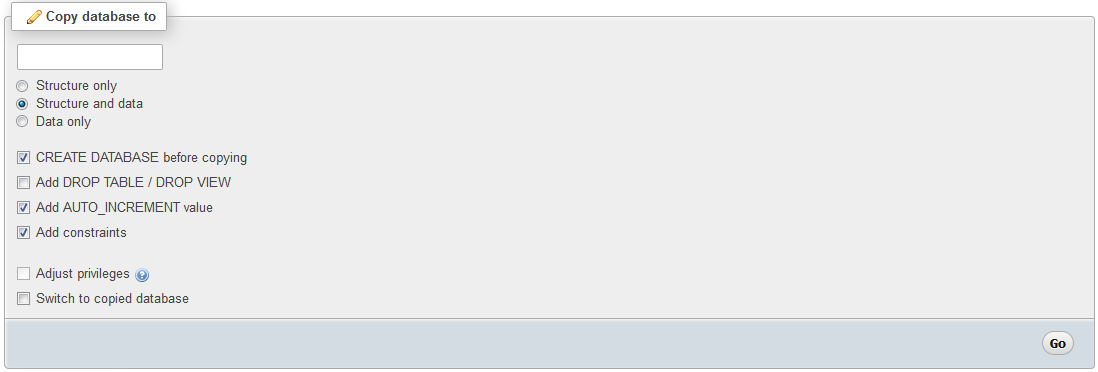
- Find the box named Copy database to.
- Type the exact name of your new database. Include the cPanel prefix, which is your account name and an underscore.
- Choose Structure and data. This copies the layout and all rows.
- Tick Add DROP TABLE only if the target already has tables with the same names. It will replace them.
- Click Go.
When it finishes, you see a success message. Click the new database to check its tables.
Warning: Do not copy onto a database that holds live data unless you want it overwritten. Take a backup first.
Another way: export and import
If the copy option is missing, or the database is big, use export and import.
- Select the old database and click the Export tab.
- Keep the Quick method and format SQL. Click Go to download a file.
- Select the new database and click the Import tab.
- Click Choose File, pick the downloaded file, and click Go.
Tip: If your site should use the copy, update the database name, user and password in its config file. For WordPress, this is wp-config.php.
Quick recap
- Create a new empty database first.
- Use Operations and Copy database to, choose Structure and data.
- Or export the old one and import into the new one.
- Back up before overwriting anything.