

What is MySQL?
MySQL is a popular system for storing data. A database made with MySQL is like a filing cabinet. Websites use it to keep posts, users and settings. Each site usually has its own database.
Way 1: Use cPanel (easiest)
cPanel is the control panel on most shared hosting plans.
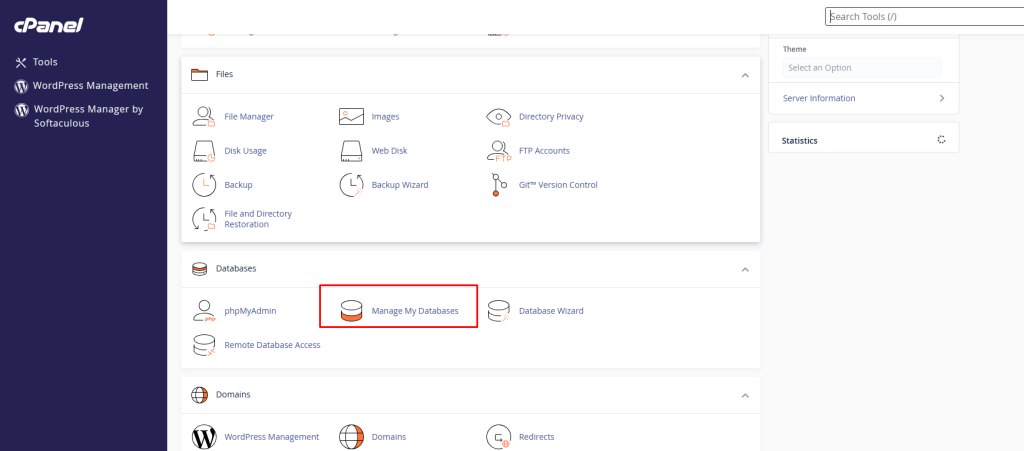
- Log in to your client area. Open your hosting service and log in to cPanel.
- Under Databases, click MySQL Databases.
- In the New Database box, type a name.
- Click Create Database.
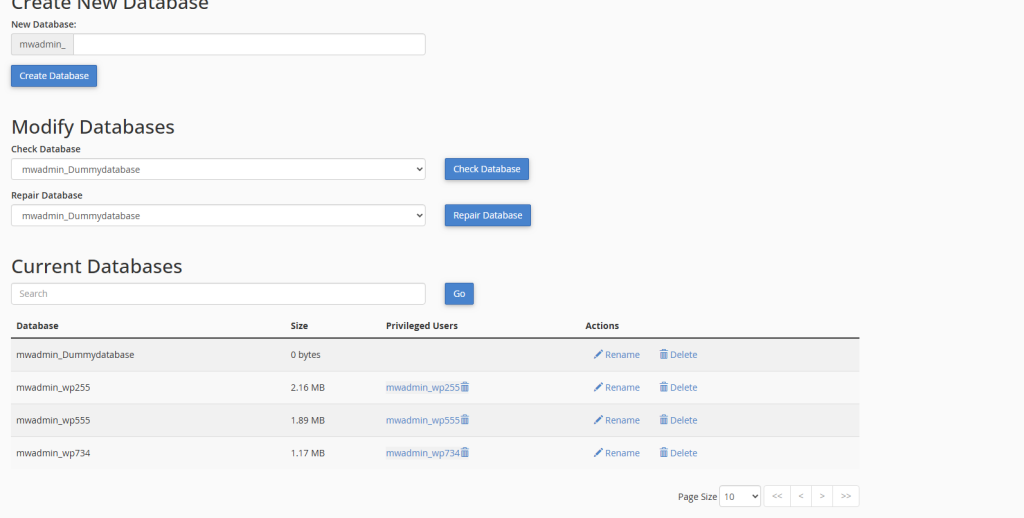
- Add a user: under MySQL Users, type a user name and a strong password, then click Create User.
- Under Add User To Database, choose the user and the database. Click Add.
- Tick ALL PRIVILEGES, then click Make Changes.
cPanel puts your account name in front of both names. Write down the full names and the password.
Way 2: Use the command line
This way is for VPS or dedicated server customers, or anyone with MySQL access over SSH. SSH is a safe way to type commands on a remote server.
- Log in to your server with SSH.
- Open MySQL:
This starts MySQL as the admin user and asks for the password.mysql -u root -p - Create the database:
This makes an empty database named mydatabase. Use your own name.CREATE DATABASE mydatabase; - Create a user:
This makes a user with a password.CREATE USER 'myuser'@'localhost' IDENTIFIED BY 'StrongPassword'; - Give the user rights:
This lets the user work with that database. The second line reloads the rights.GRANT ALL PRIVILEGES ON mydatabase.* TO 'myuser'@'localhost'; FLUSH PRIVILEGES; - Leave MySQL with
EXIT;
Tip: Use simple names with letters, numbers and underscores. Avoid spaces and special marks.
Check it worked
In MySQL, type SHOW DATABASES;. Your new database should appear in the list.
Quick recap
- A MySQL database stores your site's data.
- In cPanel, use MySQL Databases: create the database, the user, then link them.
- On a server, use
CREATE DATABASE,CREATE USERandGRANT. - Save the names and password safely.