

What is it?
MySQL is a database system. It holds your data in tables. A table is like a spreadsheet page. A schema is the plan of how data is organised. It lists the tables and the columns in each table.
information_schema is a built-in database. It holds facts about all your other databases. Think of it as the library catalogue. It does not hold books. It tells you where the books are and what they are about.
You cannot change it. It is read-only. MySQL fills it in for you.
Why look at it?
- To list all the tables in a database.
- To see the columns in a table.
- To find how big a database is.
- To see which users have which rights.
Tables inside it
| Table | What it tells you |
|---|---|
SCHEMATA | All the databases |
TABLES | All the tables and their sizes |
COLUMNS | All the columns in all tables |
STATISTICS | Index details. An index is like a book's index; it speeds up searches. |
Steps: look at it in phpMyAdmin
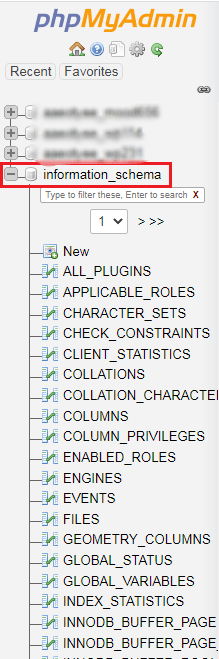
- Log in to your control panel and open phpMyAdmin.
- Click
information_schemain the left list. - Click a table, such as
TABLES, to see its rows. - Or click the SQL tab and type a question, as shown below.
This question lists the tables of one database.
SELECT TABLE_NAME FROM information_schema.TABLES WHERE TABLE_SCHEMA = 'mydatabase';Replace mydatabase with your database name.
This one shows the size of each database in megabytes.
SELECT TABLE_SCHEMA, ROUND(SUM(DATA_LENGTH + INDEX_LENGTH) / 1024 / 1024, 2) AS size_mb
FROM information_schema.TABLES
GROUP BY TABLE_SCHEMA;
Tip: On shared hosting you only see your own databases. This is normal and keeps others' data private.
Quick recap
information_schemais MySQL's own catalogue of your databases.- It is read-only. Do not try to edit it.
- Use
TABLESandCOLUMNSto find names and sizes. - Open it in phpMyAdmin or query it with SQL.