

What does the error mean?
WordPress keeps its posts and settings in a MySQL database. A database is a store for your site's information. WordPress talks to it over a connection, like a phone call.
"MySQL server has gone away" means that call was cut off. WordPress tried to ask a question, but the database was no longer listening.
Common causes
- The database server was restarted or crashed.
- A query took too long and the server hung up. A query is a request sent to the database.
- The data in one request was too large, for example a big plugin import.
- The connection sat idle too long and timed out.
- A broken plugin or theme sends bad queries.
- The database tables are damaged.
Steps to fix it
Take a backup of your files and database before changes.
- Reload the page after a minute. If the server just restarted, the error may vanish.
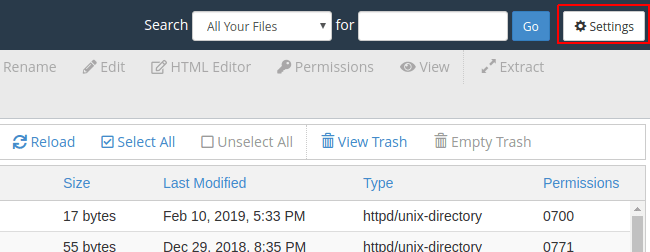
- Turn off your plugins. In cPanel, open File Manager, go to
wp-contentand rename thepluginsfolder toplugins-off. - Check the site. If the error is gone, rename the folder back. Then turn plugins on one at a time to find the bad one.
- Repair the database. Open MySQL Databases in cPanel, choose your database next to Repair Database, and click Repair Database.
- Add the WordPress repair option. Open
wp-config.phpand add this line above "That's all, stop editing":
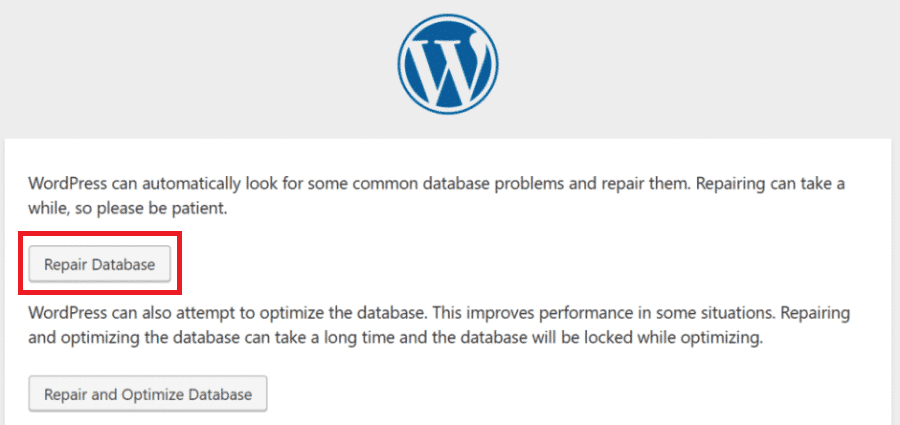
define('WP_ALLOW_REPAIR', true);This turns on a built-in WordPress repair page at /wp-admin/maint/repair.php. Remove the line when you finish, because that page needs no login.
- If you import large files, split them into smaller parts.
- Check the size of your database and clean old data such as spam comments and post revisions.
Server settings (VPS and dedicated)
If you have root access, you can raise two MySQL settings in my.cnf:
max_allowed_packet = 64M
wait_timeout = 600
The first allows larger requests. The second lets idle connections stay open longer. Restart MySQL afterwards. On shared hosting you cannot change these, so open a ticket at https://secure.hostvento.com/submitticket.php.
Quick recap
- The error means the database dropped the connection.
- Test by turning plugins off.
- Repair the database in cPanel.
- On a VPS, raise
max_allowed_packetandwait_timeout. - Contact support if it continues.