

What is a storage engine?
A database keeps information in tables. A storage engine is the part of MySQL that decides how a table is saved and read. Think of it as the type of filing system behind the table.
The two most common engines are:
- InnoDB: safe and modern. It protects your data if the server crashes. It locks single rows, so many people can write at once. It is the default in current MySQL.
- MyISAM: older and simple. It locks the whole table when writing, and it can get damaged after a crash. It does not support transactions. A transaction is a group of changes that either all succeed or all fail.
Most people move from MyISAM to InnoDB for safety and speed under load.
Before you change anything
Warning: changing the engine rebuilds the table. On large tables it can take time and lock the table. Take a full backup first, and do it at a quiet time.
Step 1: See the current engine
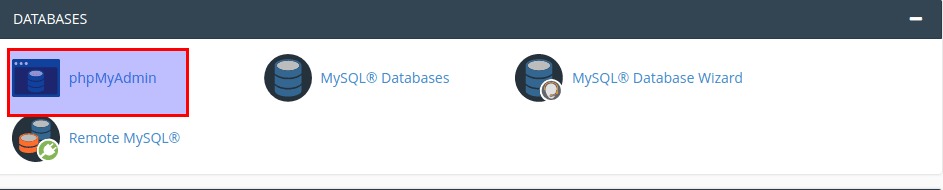
- Log in to cPanel and open phpMyAdmin.
- Click your database name.
- Look at the Type column in the table list. It shows InnoDB or MyISAM.
Or run this on the SQL tab:
SELECT TABLE_NAME, ENGINE FROM information_schema.TABLES WHERE TABLE_SCHEMA = 'your_database';This lists every table with its engine. Replace the database name with yours.
Step 2: Change the engine in phpMyAdmin
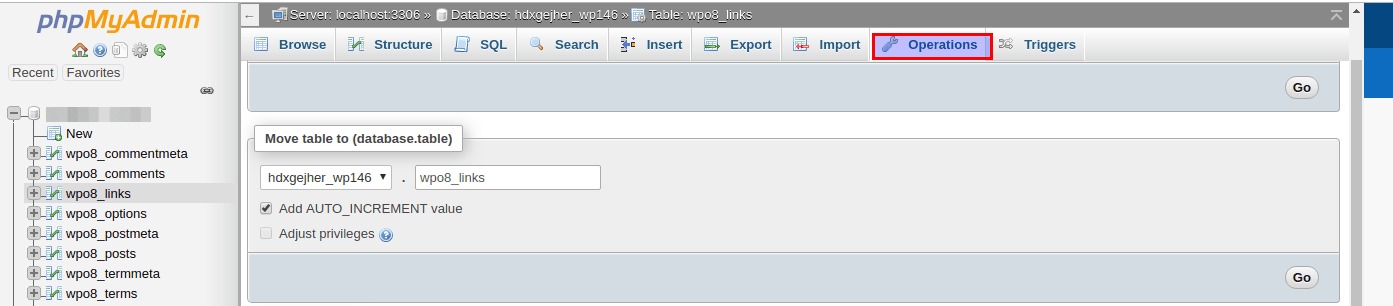
- Click the table name.
- Open the Operations tab.
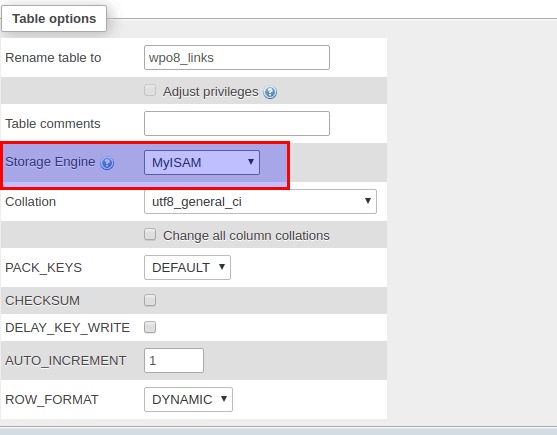
- Find Table options.
- In the Storage Engine drop-down, pick InnoDB.
- Click Go.
Step 2 (other way): Use SQL
Open the SQL tab and run:
ALTER TABLE tablename ENGINE = InnoDB;This converts one table. Replace tablename with the real name.
Convert many tables at once
Run this to make a list of commands for every MyISAM table:
SELECT CONCAT('ALTER TABLE `', TABLE_NAME, '` ENGINE=InnoDB;') FROM information_schema.TABLES WHERE TABLE_SCHEMA = 'your_database' AND ENGINE = 'MyISAM';Copy the results and run them on the SQL tab.
Things to know
- Tables with FULLTEXT indexes need MySQL 5.6 or newer to use InnoDB.
- InnoDB can use more memory. On a small plan, watch your usage.
- Do not change tables of the
mysqlsystem database.
Tip: After the change, open your website and test it. If something breaks, restore the backup you took.
Quick recap
- The storage engine decides how a table is stored.
- InnoDB is safer and better for busy sites than MyISAM.
- Use Operations in phpMyAdmin, or
ALTER TABLE ... ENGINE = InnoDB;. - Back up first, because the table is rebuilt.
- Test your site afterwards.