

What are MariaDB and SSH?
MariaDB is a database program. It works almost like MySQL, and many servers use it. A database is a store for your website's information, kept in tables.
SSH is a safe way to type commands on your server from your own computer. You need SSH access on your plan. On a VPS or dedicated server you usually have it. Ask Hostvento support if you are not sure.
Step 1: Connect with SSH
- Open a terminal on Mac or Linux. On Windows, use PowerShell or a tool like PuTTY.
- Type the command with your own details:
ssh username@your-server-addressYour username and server address are in your welcome email. Enter your password when asked.
Step 2: Log in to MariaDB
mysql -u your_user -pThe mysql command also works for MariaDB. The -u option sets the user and -p asks for the password. On a VPS with root access you can use mysql -u root -p.
When you see the prompt MariaDB [(none)]>, you are in.
![Screenshot: When you see the prompt MariaDB [(none)]> , you are in.](/knowledge-base/assets/img/view-mariadb-databases-in-ssh/1.png)
![Screenshot: When you see the prompt MariaDB [(none)]> , you are in.](/knowledge-base/assets/img/view-mariadb-databases-in-ssh/2.png)
![Screenshot: When you see the prompt MariaDB [(none)]> , you are in.](/knowledge-base/assets/img/view-mariadb-databases-in-ssh/3.png)
Step 3: List the databases
SHOW DATABASES;This prints every database your user may see. Always end commands with a semicolon.
Step 4: Pick a database and list its tables
USE dbname;
SHOW TABLES;
The first line selects the database. The second lists its tables. Replace dbname with a name from the list.
Step 5: Look inside a table
DESCRIBE tablename;
SELECT * FROM tablename LIMIT 5;
The first line shows the columns of the table. The second shows the first five rows.
Useful extras
- Check the size of each database:
SELECT table_schema, ROUND(SUM(data_length + index_length)/1024/1024, 2) AS size_mb FROM information_schema.tables GROUP BY table_schema;This prints each database name and its size in megabytes.
- See the MariaDB version with
SELECT VERSION();.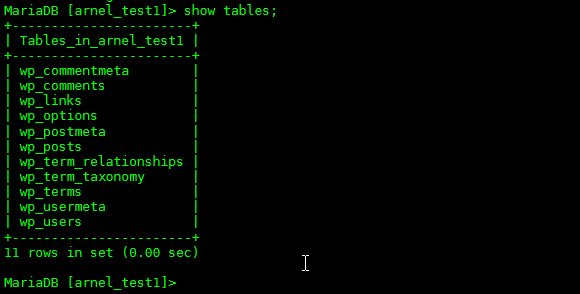
- Leave MariaDB by typing
EXIT;.
Quick one-line version
mysql -u your_user -p -e "SHOW DATABASES;"This runs one command and then returns you to the normal prompt.

DROP and DELETE. They remove data for good. Take a backup first.Quick recap
- Connect with SSH, then run
mysql -u user -p. SHOW DATABASES;lists the databases.USE dbname;andSHOW TABLES;list the tables.DESCRIBEandSELECTshow table details.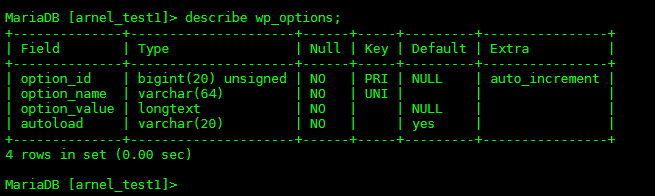
- Leave with
EXIT;.