

What is the root password?
Root is the main administrator login of a server. It can do everything. The root password is the key to it. If someone else learns it, they can take over your server. So keep it long and private. Change it if you think others know it.
You need root access to WHM for this guide.
Steps
- Open your browser and go to
https://your-server-ip:2087. - Log in as root with your current password.
- Type Change Root Password in the search box on the left.
- Click Change Root Password.
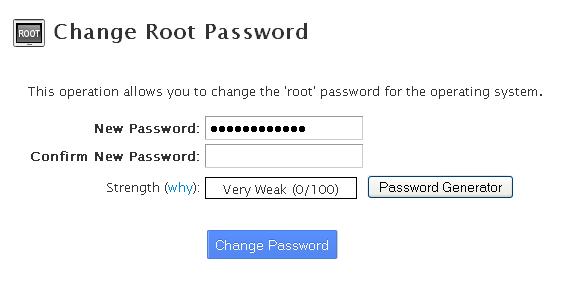
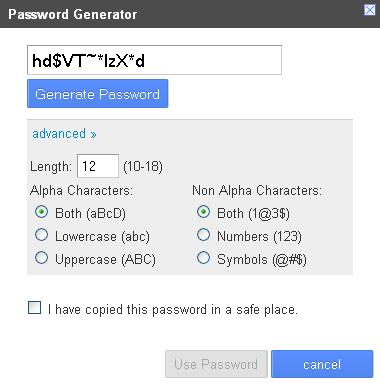
- Type your new password in the New Password box. You can use Password Generator to make a strong one.
- Type it again in the second box, if WHM asks.
- Click Change your password now!
- Log out, then log in again with the new password to test it.
How to pick a strong password
- Use at least 12 characters. Longer is better.
- Mix capital letters, small letters, numbers and symbols.
- Do not use your name, birthday or a plain word.
- Do not reuse a password from another site.
- Store it in a password manager. A password manager is an app that remembers passwords for you.
Good to know
This changes the password for the server's root user. Your SSH login as root uses the same password, unless you log in with keys. Update any tool or script that stores the old one.
Tip: If you cannot log in to WHM because you forgot the password, you cannot reset it from inside. Open a ticket at https://secure.hostvento.com/submitticket.php and ask support to help.
Quick recap
- Log in to WHM as root.
- Open Change Root Password, enter a strong new password and save.
- Test the new login and update anything that used the old one.
- Never share the root password.