

What is TTL
TTL stands for Time To Live. It has two meanings:
- In DNS, TTL tells resolvers how many seconds they may keep a record in cache. After that they must ask again.
- In IP networks, TTL is a number in each packet that goes down by one at every router (hop). When it reaches 0 the packet is dropped. This stops packets from looping forever.
TTL in Linux networks
ping: see the TTL in the replies
ping www.google.com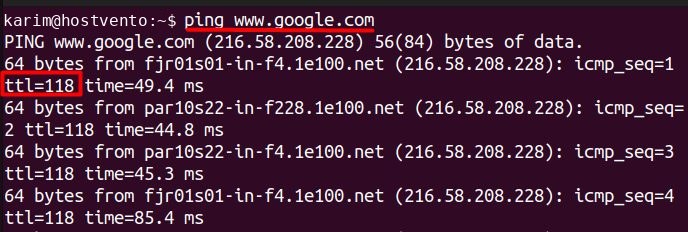
Each reply shows ttl=.... A packet starts with a value such as 64 (Linux), 128 (Windows) or 255 (network devices). The number you see is what is left after the hops. This also hints at the operating system of the remote host.
traceroute: see each hop
traceroute www.google.com
traceroute sends packets with TTL 1, 2, 3 and so on. Each router that drops a packet sends back a message, so you see the whole path.
Default TTL on your system
cat /proc/sys/net/ipv4/ip_default_ttlip route show
ip route show
It shows the routes your packets use.
When to change a TTL value
DNS caching
A short DNS TTL means changes (like a new IP) spread fast, but there are more DNS queries. A long TTL means fewer queries and faster lookups, but changes spread slowly.
Network security and troubleshooting
You can use low TTL values in traceroute to find where a connection fails. Some firewalls and tools also look at the TTL of packets.
Tuning applications
Proxies and CDNs often use TTL to decide how long cached content stays fresh. Choose a value that balances freshness against load.
How to choose the right DNS TTL
| Situation | Suggested TTL |
|---|---|
| Before you move a site or change an IP | 300 s (5 minutes) |
| Normal websites | 3600 s (1 hour) |
| Rarely changing records (MX, NS, TXT) | 14400 to 86400 s (4 to 24 hours) |
| Failover or load balancing records | 60 to 300 s |
Steps for a safe migration:
- A day or two before the change, lower the TTL to 300.
- Wait until the old TTL has passed.
- Change the record.
- When all works, set the TTL back to a high value.
Check a DNS TTL
dig example.com AThe number in the answer section is the remaining TTL in seconds.
Quick recap
- DNS TTL is how long a record stays in cache. Lower it before changes.
- Packet TTL counts hops and stops loops.