

Nmap is a free network scanner. It finds hosts, open ports, services and operating systems.
Warning: Scan only systems you own or have written permission to test. Unauthorized scanning can be illegal and can be seen as an attack.
Target specification
Scan one host:
nmap <target_host>Example:
nmap 192.168.1.1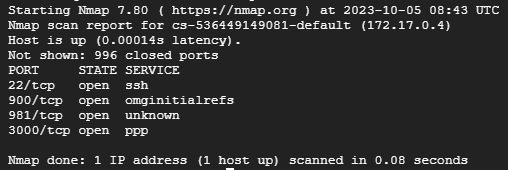
Other ways to name targets:
nmap 192.168.1.1 192.168.1.2        # several hosts
nmap 192.168.1.0/24                 # a whole subnet
nmap 192.168.1.1-50                 # a range
nmap -iL hosts.txt                  # targets from a file
nmap --exclude 192.168.1.5 192.168.1.0/24
Use -n to skip DNS lookups (faster) and -R to always resolve names.
Scan techniques
- TCP SYN scan (
-sS): the default for root. It sends SYN packets and does not finish the connection, so it is fast and quiet. - TCP connect scan (
-sT): a full connection, used when you are not root. - UDP scan (
-sU): sends UDP packets to find UDP services. It is slow. - ACK scan (
-sA): sends ACK packets to learn which ports a firewall filters. - Window scan (
-sW): like ACK but looks at the TCP window field. - Idle scan (
-sI zombie): uses a third host to send the packets, so your IP is not shown to the target.
Port specification
nmap -p 80 192.168.1.1
nmap -p 80,443,22 192.168.1.1
nmap -p 1-1000 192.168.1.1
nmap -p- 192.168.1.1                # all 65535 ports
nmap -F 192.168.1.1                 # the 100 most common ports
Service and version detection
nmap -sV -p 80 192.168.1.1Operating system detection
sudo nmap -O 192.168.1.1Aggressive mode (OS, versions, scripts and traceroute):
sudo nmap -A 192.168.1.1Host discovery
nmap -sn 192.168.1.0/24             # ping scan, no port scan
nmap -Pn 192.168.1.1                # skip discovery, treat host as up
Scripts (NSE)
nmap --script default 192.168.1.1
nmap --script vuln 192.168.1.1
Timing and performance
-T0 to -T5 set the speed. -T0 is the slowest and stealthiest, -T3 is the default, and -T4 is a good fast choice on a reliable network. -T5 is very aggressive and can miss results.
nmap -T4 192.168.1.1Output
nmap -oN scan.txt 192.168.1.1       # normal text
nmap -oX scan.xml 192.168.1.1       # XML
nmap -oA scan 192.168.1.1           # all formats
nmap -v 192.168.1.1                 # more detail
Use Nmap responsibly
- Get permission first.
- Scan during quiet hours and at a gentle speed on production systems.
- Keep records of what you scanned and why.
Quick recap
nmap -sV -p 1-1000 targetis a good start.- Add
-Ofor the OS and-Afor everything.