
What is the error
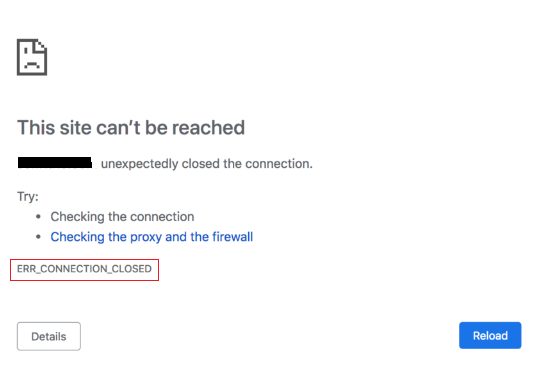
ERR_CONNECTION_CLOSED appears in Chrome when the connection to a website is closed before the page loads. The message says "This site can't be reached. The connection was closed unexpectedly."
It can come from:
- Your internet connection.
- Your browser.
- The website or its server.
Causes
On the visitor's side
- Internet connection. A weak or unstable connection can close the link.
- Browser problems. A damaged cache, bad extensions or wrong settings.
- Proxy or VPN. A wrong proxy configuration blocks the connection.
- Antivirus or firewall that blocks the site.
On the server's side
- Server downtime. The server may be down or restarting.
- Overload. Too many requests make the server drop connections.
- Firewall rules. The server firewall or a security tool may block your IP.
- Wrong SSL or web server settings.
How to fix it as a visitor
- Check your internet. Open another website. Restart the router if needed.
- Reload the page, or try again a bit later.
- Clear the browser cache and cookies. In Chrome go to Settings > Privacy and security > Delete browsing data.
- Disable the extensions. Test in an incognito window (
Ctrl+Shift+N). - Turn off the proxy or VPN. In Windows go to Settings > Network & Internet > Proxy and turn off the proxy. Disable the VPN for a test.
- Flush the DNS cache. On Windows run
ipconfig /flushdns. On macOS and Linux use the command for your system. - Change the DNS servers to a public service, such as 8.8.8.8 and 8.8.4.4 or 1.1.1.1.
- Pause your antivirus or firewall briefly to test.
- Reset the network settings (Windows):
netsh winsock resetandnetsh int ip reset, then restart. - Try another browser or device.
How to fix it as a site owner
- Check that the server is up and not overloaded (CPU, memory, disk). Restart the web server if needed.
- Check the logs. Look at the web server error log and the system log for crashes.
- Check the firewall. Make sure the visitor's IP is not blocked by the firewall, Fail2Ban or a security plugin.
- Check the SSL certificate and the HTTPS settings. A bad configuration can close the connection.
- Check the web server limits such as worker processes,
max_clientsand timeouts. - Check the CDN or proxy (for example Cloudflare) and its settings.
- Contact your host if the server problem is outside your control.
Quick recap
- Visitors: check the internet, clear the cache, disable the proxy/VPN and change the DNS.
- Owners: check the server load, firewall, logs and SSL.