

What is the command line?
The command line is a screen where you type words to tell a computer what to do. You do not click buttons. You type a command and press Enter.
It is like sending a text message to your computer. It looks plain, but it is powerful. Many server guides use it.
Open it on your own computer
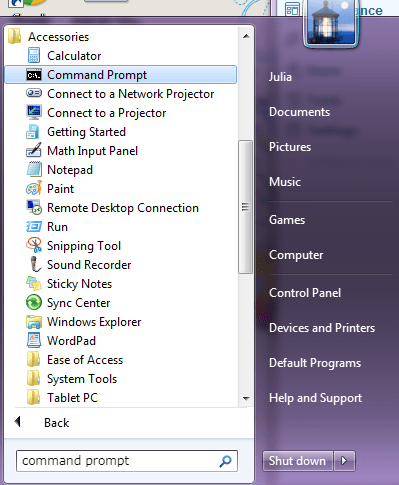
Windows
- Press the Windows key.
- Type
cmdorPowerShell. - Press Enter. A dark window opens.
Mac
- Press Command and Space together.
- Type
Terminal. - Press Enter.
Linux
- Press Ctrl, Alt and T together. This opens the terminal on many systems.
- Or search your apps for Terminal.
Open the command line on your server
To reach your server you use SSH. SSH is a safe way to control another computer over the internet. You need the server's IP address, a username and a password. Your welcome email may list them. If not, ask Hostvento support. You can open a support ticket. Some hosting plans do not include SSH, so ask support if you are not sure.
- Open the command line on your computer, as shown above.
- Type this, using your own username and server address:
ssh username@your-server-ipThis asks to connect to your server.
- The first time, you may be asked to trust the server. Type
yesand press Enter.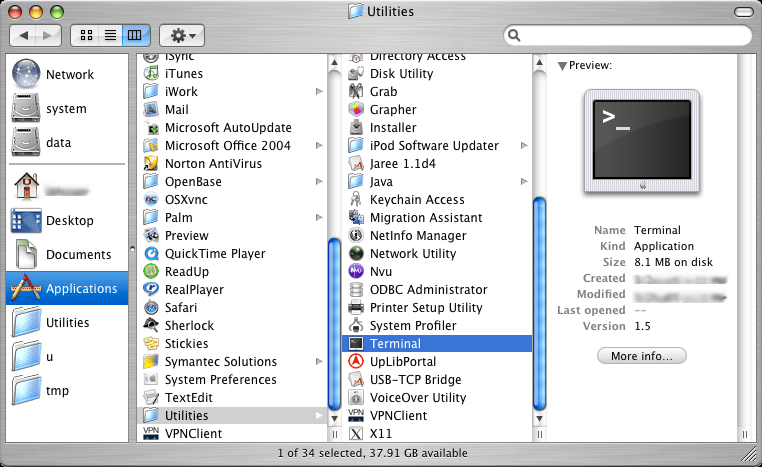
- Type your password and press Enter. You will not see the letters as you type. This is normal.
- You are in when you see a line ending in
$or#.
Tip: On older Windows, install a free program called PuTTY to use SSH. Newer Windows has SSH built in.
Try a few safe commands
pwdThis shows which folder you are in.
lsThis lists the files in that folder.
exitThis closes your SSH session.
Warning: Be careful with commands you do not understand. Some, like
rm, delete files for good. Take a backup first.Quick recap
- The command line is a screen where you type instructions.
- Open Command Prompt, Terminal or PowerShell on your computer.
- Use SSH to reach your server.
- Password letters stay hidden while you type.
- Type
exitto leave.