

What it means
The error PR_END_OF_FILE_ERROR appears in Firefox when the secure connection to a site ends in the middle of the handshake.
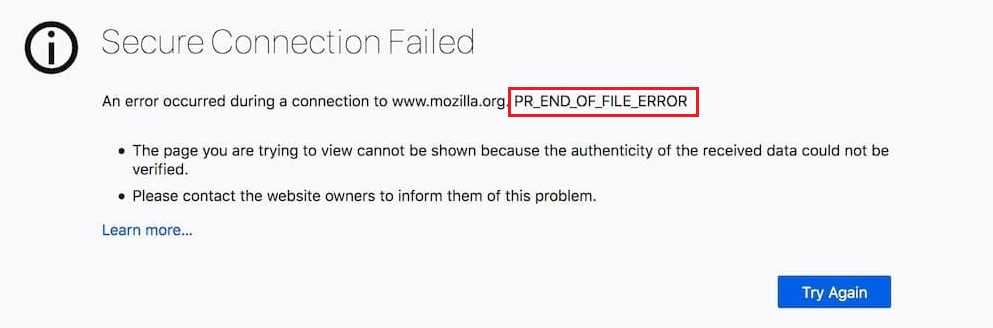
Common causes:
- Antivirus or firewall software that misreads the secure connection.
- A VPN or proxy with wrong settings or limits.
- SSL settings in Firefox or on the server.
- A short network problem on your side or on the site.
Fixes
- Clear history and cache. Press
Ctrl + Shift + Delete, choose Everything as the time range and click OK.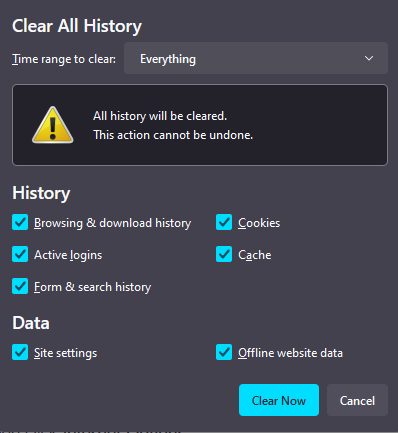
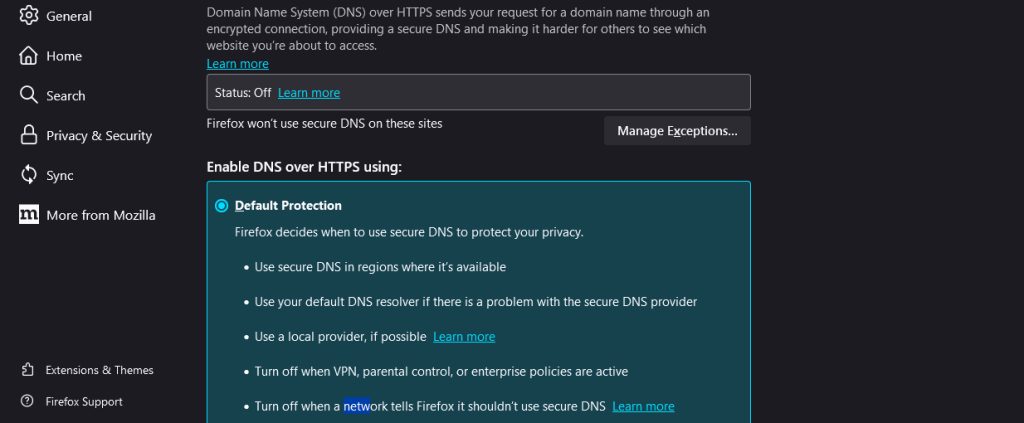
- Turn on DNS over HTTPS. Open Settings, then General, scroll to Network Settings and click Settings. Tick Enable DNS over HTTPS at the bottom. Test the site again.
- Turn off the VPN or proxy for a test.
- Turn off antivirus HTTPS scanning or the firewall for a moment, and test the page.
- Start Firefox in Troubleshoot Mode (Help, then Troubleshoot Mode) to test without extensions.
- Update Firefox and restart it.
- If only one site fails, contact the site owner. Their server may use a wrong TLS setup.
Good to know
- Update Firefox to get the latest security fixes.
- Browser add-ons can break secure connections. Turn them off one by one to find the cause.
- In rare cases, a complex network problem causes the error. Try another network.
Quick recap
- The secure connection broke in the middle.
- Clear the cache, enable DNS over HTTPS and check the VPN and antivirus.
- Contact the site if only one site fails.