

The ip command is part of the iproute2 package. It manages network interfaces, addresses, routes and tunnels, and it replaces older tools like ifconfig and route. It works on Ubuntu, Debian, CentOS and other distributions.
Syntax
ip [OPTIONS] OBJECT [COMMAND] [PARAMETERS]- OPTIONS are optional flags that change the output.
- OBJECT is what you manage:
link(interface),addr(IP address),routeorneigh(ARP table). - COMMAND is the action, such as
show,add,delorset. - PARAMETERS are the details, like the interface name or an address.
Show network interfaces
ip addr show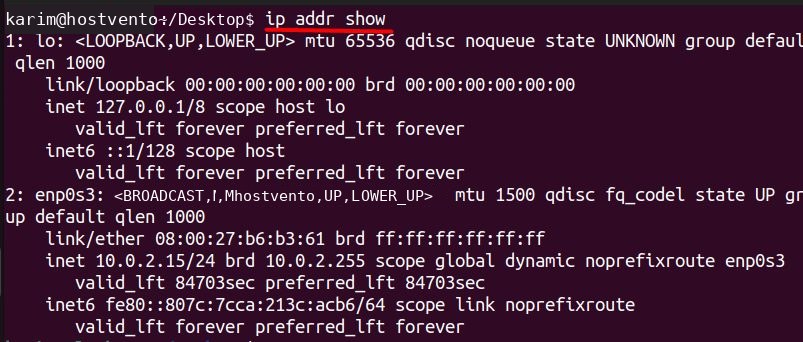
The output lists interface names (like eth0, enp0s3), MAC addresses, IPv4 and IPv6 addresses and the state (UP or DOWN).
Bring an interface up or down
sudo ip link set dev enp0s3 up
Use down to turn it off.
Add an IP address
sudo ip addr add 192.168.1.100/24 dev enp0s3
This gives the interface the address 192.168.1.100 with the mask /24 (255.255.255.0).
Remove an IP address
sudo ip addr del 192.168.1.100/24 dev enp0s3
Show the routing table
ip route show
It lists destination networks, gateways and the interfaces used.
Add a route
sudo ip route add 192.168.2.0/24 via 10.0.2.1 dev enp0s3
Traffic for 192.168.2.0/24 now goes through the gateway 10.0.2.1.
Set the default gateway
sudo ip route add default via 10.0.2.1
All traffic without a more specific route uses this gateway.
Remove a route
sudo ip route del 192.168.2.0/24 dev enp0s3
Show the ARP table
The ARP table maps IP addresses to MAC addresses on the local network.
ip neighbour show
Add a static ARP entry
sudo ip neighbour add 10.0.2.10 lladdr 00:11:22:33:44:55 dev enp0s3
Delete an ARP entry
sudo ip neighbour del 10.0.2.10 dev enp0s3
Remove all addresses from an interface
sudo ip addr flush dev enp0s3
ip are temporary. They disappear after a reboot. Save permanent settings in Netplan, NetworkManager or your network config files.FAQ
What is the ip command? The tool from iproute2 to configure the network.
How do I list interfaces? ip addr show, or ip -br a for a short table.
How do I bring an interface down? sudo ip link set eth0 down.
How do I view routes? ip route show.
Quick recap
ip addr,ip link,ip routeandip neighbourcover most jobs.- The changes last until the next reboot.