

What is a pipe
The pipe | sends the output of one command straight into another command. You can build small tools into powerful ones without temporary files.
How it works
- Run the first command. It produces some output.
- Add the pipe. Type
|after the first command. - Run the second command. It reads the output of the first as input.
- Repeat. You can chain as many commands as you need.
Basic examples
List only the .txt files:
ls | grep ".txt"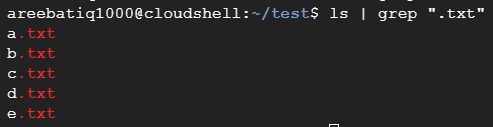
Search a file for a word:
cat myfile.txt | grep "keyword"
(grep "keyword" myfile.txt gives the same result.)
More ways to use pipes
- Transform data. Sort, cut and count the output.
- Control the next step. Use the output to decide what to do.
- Process files. Automate copying, moving or renaming.
- Build scripts. Combine simple commands in one line.
Chain several commands
cat log.txt | grep "error" | sort -k 1 | cut -d " " -f 2-This reads the log, keeps the lines with "error", sorts them by the first field and prints everything from the second field.
Other useful examples
Count the files in a folder:
ls | wc -lShow the 5 biggest folders:
du -sh * | sort -rh | head -5Find a running process:
ps aux | grep nginxScroll long output:
dmesg | lessSave and show output at once:
ls -l | tee list.txtWhy use pipes
- Simple. Each command does one job well.
- Fast. Data flows in memory, no temporary files.
- Flexible. You can combine any commands.
- Easy to read when you keep the chain short.
Quick recap
command1 | command2feeds the output of the first into the second.- Chain many commands, one idea at a time.