

tar (tape archive) joins many files and folders into one archive file. With an option it also compresses the archive (gzip, bzip2 or xz).
Syntax
tar [options] [archive_name] [files_or_directories]Main options
-ccreates a new archive.-xextracts files from an archive.-tlists the contents of an archive.-fgives the name of the archive file. Always put it last in a group of options, before the file name.-vshows the files while it works (verbose).-zcompresses or decompresses with gzip (.tar.gz).-juses bzip2 (.tar.bz2).-Juses xz (.tar.xz).-rappends files to an existing, uncompressed archive.-uadds files that are newer than those in the archive.-Ajoins several archives.-Wverifies the archive after writing it.-Cchanges to a folder before it extracts or creates.
Create an archive
tar -cvf archive.tar folder/
Create a compressed archive
gzip:
tar -czvf archive.tar.gz folder/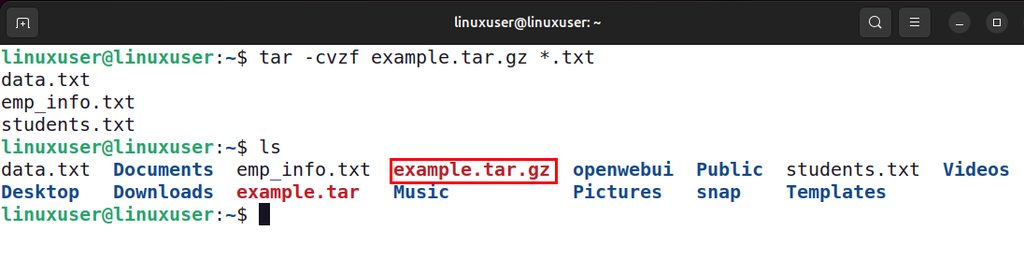
bzip2 (smaller, slower):
tar -cjvf archive.tar.bz2 folder/
xz (smallest, slowest):
tar -cJvf archive.tar.xz folder/List the contents
tar -tvf archive.tar.gzExtract an archive
gzip archive in the current folder:
tar -xzvf archive.tar.gz
Into a chosen folder:
tar -xzvf archive.tar.gz -C /path/to/folderbzip2 archive:
tar -xjvf archive.tar.bz2Any type (modern tar picks the compression by itself):
tar -xf archive.tar.xz
Extract one file:
tar -xzvf archive.tar.gz folder/file.txtAdd files to an archive
tar -rvf archive.tar newfile.txtThis works for uncompressed archives only.
Exclude files
tar -czvf backup.tar.gz --exclude='*.log' --exclude='node_modules' project/Check an archive
tar -tzf archive.tar.gz > /dev/null && echo OKTips
- Use absolute paths carefully. By default tar removes the leading
/from paths. - Add a date to backup names:
backup-$(date +%F).tar.gz. - Preserve permissions with
-pwhen you extract as root.
Quick recap
- Create:
tar -czvf name.tar.gz folder/ - Extract:
tar -xzvf name.tar.gz - List:
tar -tzvf name.tar.gz