

What is Telnet
Telnet is an old protocol and command to connect to a remote machine on a TCP port, by default port 23.
Features
- Simple. It is a quick way to test whether a port is reachable.
- Interactive. You can type text to services such as a web server, SMTP or POP3 server and see the reply.
Limitations
- No security. Telnet sends everything, including passwords, as plain text.
- Replaced by SSH, which does the same job with encryption.
Use telnet today to test ports and talk to text-based services, not to log in to servers.
Install Telnet
Debian and Ubuntu:
sudo apt update && sudo apt install telnetCentOS and Red Hat:
sudo yum install telnetFedora:
sudo dnf install telnetTest a port
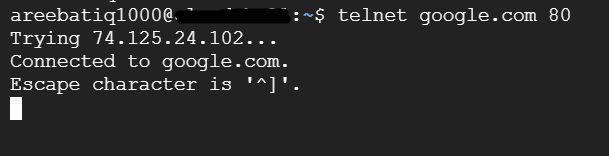
telnet example.com 80Connected to example.com.means the port is open.Connection refusedmeans nothing listens on the port.- A long wait means a firewall probably drops the traffic.
To leave, press Ctrl+] and type quit.
Talk to a web server
telnet example.com 80
GET / HTTP/1.1
Host: example.com
Press Enter twice. The server answers with its headers and page.
Test a mail server
telnet mail.example.com 25
EHLO test.example.com
QUIT
Set up a Telnet server (not recommended)
Installing a Telnet server (telnetd) is not recommended. If you need remote login use SSH. If you must test, install it only on a closed network and remove it afterwards.
Other tools to test a port
nc -vz example.com 80nc (netcat) does the same and does not need the old client.
Quick recap
telnet host porttests a TCP port.- Do not use Telnet for logins; use SSH.