

What is wall
wall ("write all") sends a message to the terminals of all users who are logged in. It is useful for warnings about maintenance, reboots or emergencies.
Syntax
wall [options] [message | file]- options change how the command works.
- message is the text to send.
- file is a file that holds the text.
Common options
-nhides the banner ("Broadcast message from ...").-t timeoutsets the time in seconds to try to deliver the message. The default is 300 seconds.-g groupsends only to users in a group.-Vshows the version.-hshows the help.
Examples
Send a short message
wall "The system will undergo maintenance at 3 PM."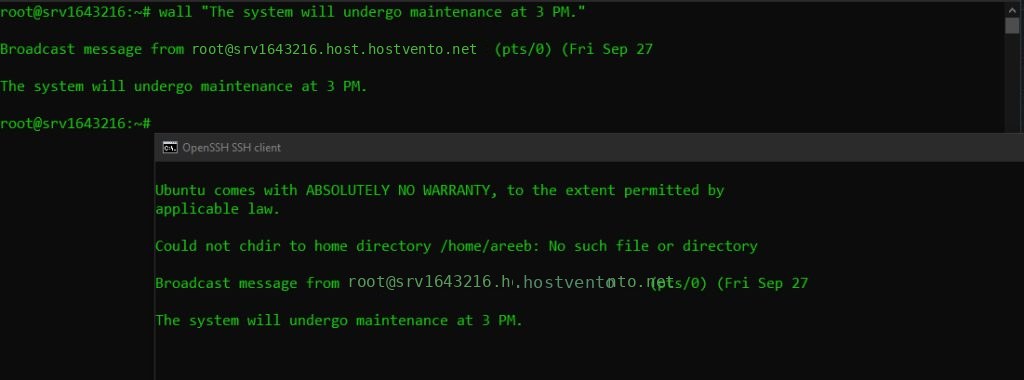
All logged-in users see a banner with your user name, host and time, then the message.
Send a message from a file
wall /path/to/message.txt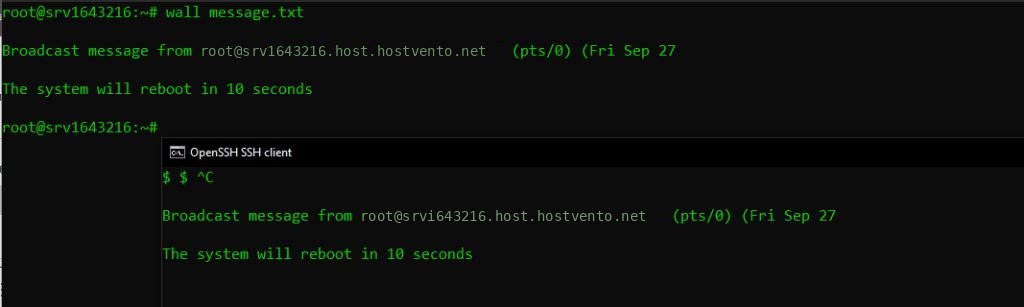
Send without the banner
wall -n "Please save your work."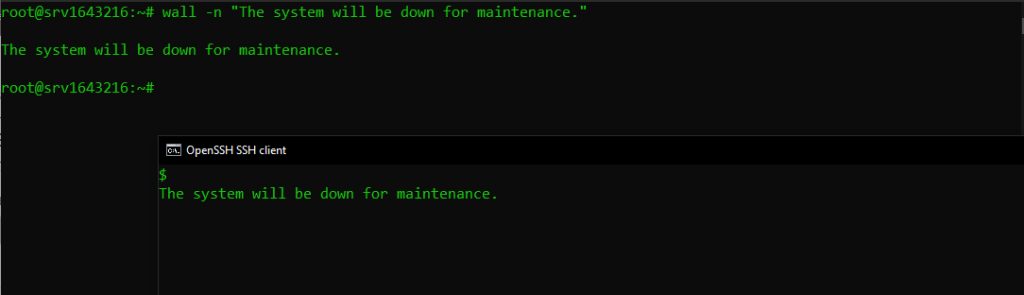
The -n option is for the root user only.
Send to a group
wall -g developers "Deployment starts in 10 minutes."Pipe the message
echo "Server restarts in 5 minutes" | wallNotes
- Users with
mesg nset do not receive messages from normal users. Messages from root are always shown. shutdownuseswallto warn users, for examplesudo shutdown -r +10 "Rebooting for updates".- Messages go to terminals and do not reach people who are not logged in.
Quick recap
wall "text"sends a message to all logged-in users.