

What is a page title?
The page title is the short name of a page. It appears on the browser tab. It is also the blue link people see in Google results. A good title is clear and tells people what your shop sells.
The default page title is the one Magento uses when a page does not have its own title.
Magento 2 steps
- Log in to the Magento admin panel.
- In the left menu, click Content.
- Under Design, click Configuration.
- Find the row for your store. Click Edit in that row. Use the row called Global to change every store view at once.
- Open the section called HTML Head.
- Find Default Page Title and type your new title.
- If you wish, fill in Title Prefix and Title Suffix. These add words before and after every title, such as your shop name.
- Click Save Configuration.
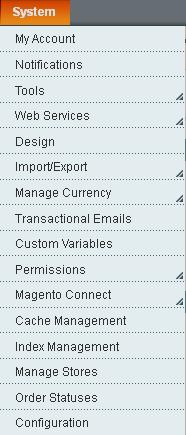
- Go to System, then Cache Management. Click Flush Magento Cache.
Magento 1 steps
- Log in to the admin panel.
- Click System, then Configuration.
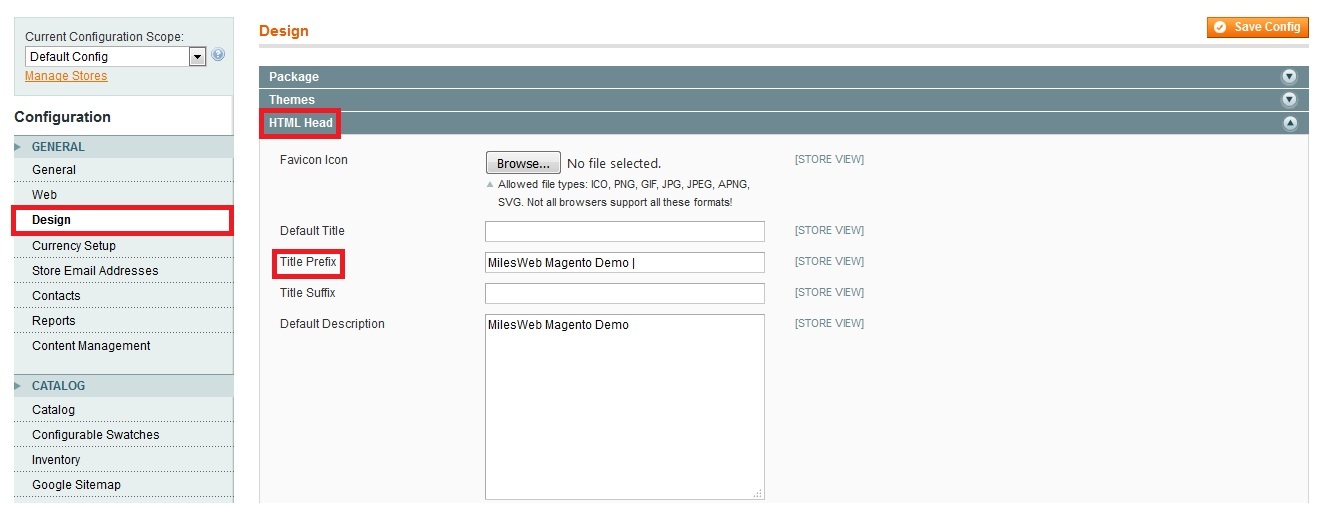
- In the left list under General, click Design.
- Open the HTML Head section.
- Change Default Title.
- Click Save Config.
- Go to System, then Cache Management, and click Flush Magento Cache.
If you have several stores, use the Current Configuration Scope drop-down in the top left to choose which one you are changing.
Tip: Keep titles under about 60 characters. Longer titles get cut off in search results.
Check the result
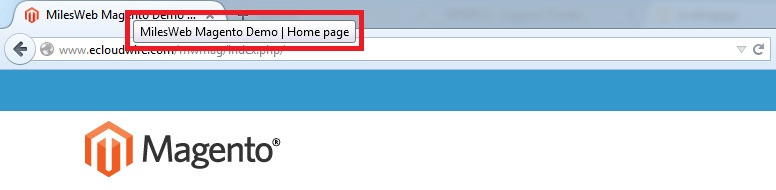
- Open your store in a new browser window.
- Look at the browser tab. You should see the new title.
Individual products, categories and pages have their own title field. These override the default title.
Quick recap
- The page title shows on the browser tab and in Google.
- Magento 2: Content, Design, Configuration, HTML Head.
- Magento 1: System, Configuration, Design, HTML Head.
- Save and flush the cache.