

What is the load average
The load average is the average number of processes that wanted the CPU over a period. It counts two kinds of processes:
- Runnable. They run now or wait in line for a CPU.
- Uninterruptible. They wait for something such as disk input and output, and cannot be interrupted.
It is a number, not a percentage.
The three values
- 1 minute. The very recent load.
- 5 minutes. A short trend.
- 15 minutes. The longer trend.
Example: 0.50, 1.20, 2.40 means the load is falling. 3.50, 1.20, 0.40 means it is rising.
How to read the values
- Compare the load with the number of CPU cores. Find the cores with
nproc. - A load equal to the core count means the CPU is fully used. On a 4-core server, a load of 4.00 is full.
- A load far above the core count means processes wait in a queue.
- A load of 6 is fine on 8 cores but a problem on 2 cores.
- The type of work matters. Tasks like video encoding raise the load naturally.
Check the load average
uptime
uptime
The last three numbers are the 1, 5 and 15 minute values.
top
top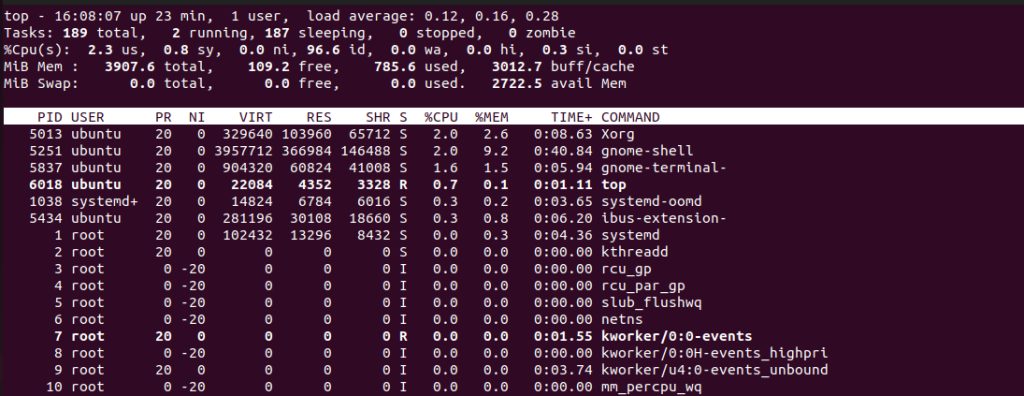
The load average is in the first line.
htop
htop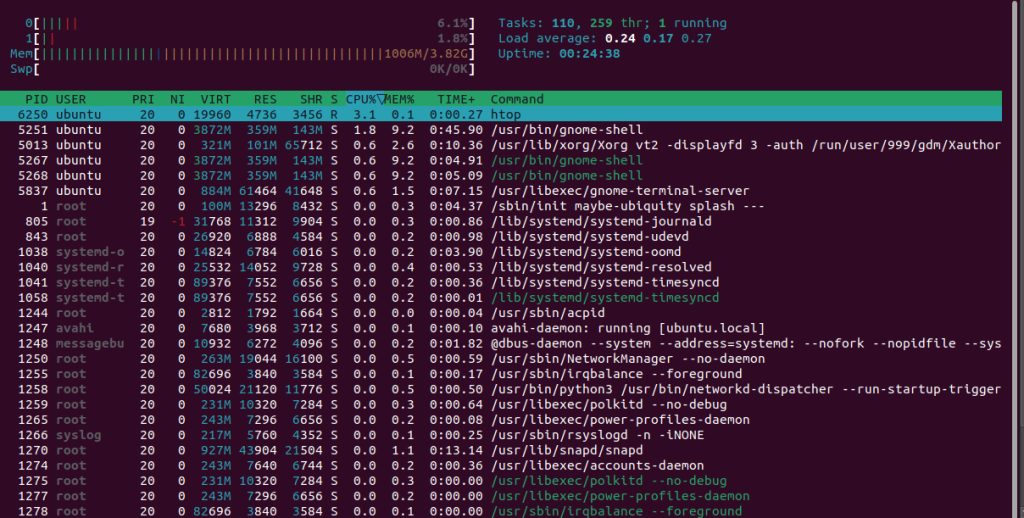
/proc/loadavg
cat /proc/loadavg
The first three numbers are the load averages. The fourth is running/total processes, and the last is the most recent PID.
High load but low CPU use
Then processes probably wait for the disk or the network. Check with iostat -x 2 or vmstat 2 and look at the I/O wait.
What to do when the load is high
- Find the heaviest processes with
toporps aux --sort=-%cpu | head. - Check disk and memory use.
- Stop or tune the process, or add CPU cores.
Quick recap
- Load average has three numbers: 1, 5 and 15 minutes.
- Compare it with the number of CPU cores.