

What is LiteSpeed Web Cache Manager?
LiteSpeed is a web server program. A web server is the software that sends your pages to visitors. LiteSpeed can keep saved copies of your pages. This saved copy is called a cache. Visitors then get pages faster, because the server does not rebuild them each time.
LiteSpeed Web Cache Manager is a tool in cPanel. It lets you turn this server cache on for your WordPress sites and other apps. Think of it as the main switch for the cache.
Not every plan uses LiteSpeed. Ask Hostvento support if the tool is on your plan.
Steps for a cPanel account
- Log in to your Hostvento client area at https://secure.hostvento.com/clientarea.php.
- Open Services, choose your hosting plan and log in to cPanel.
- Type
LiteSpeedin the search box. Click LiteSpeed Web Cache Manager.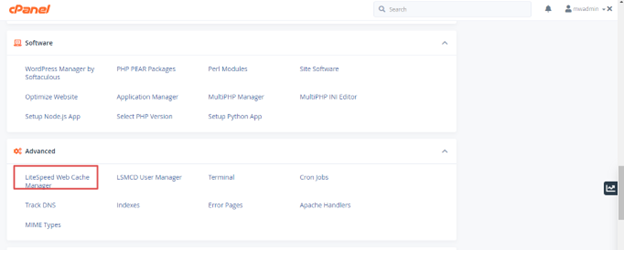
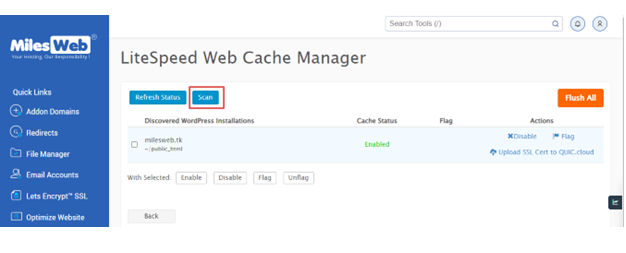
- Click WordPress Cache.
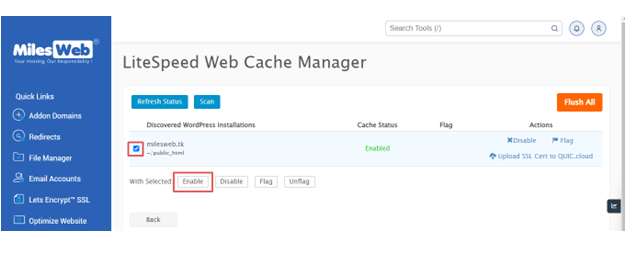
- Click Enable. This turns on the server cache for WordPress sites in your account. Follow the notes on screen.
- Wait for the success message.
- If you use another web app, return to the main screen and look for other cache options.
The tool may have an option to install the LiteSpeed Cache plugin. A plugin is a small add-on for WordPress. Use it if you want more control, such as which pages to skip.
Steps for a server owner
If you have a VPS or dedicated server with root access, you may need to turn on the cache in WHM first. WHM is the admin side of cPanel. This needs a LiteSpeed licence on the server.
- Log in to WHM as root.
- Search for LiteSpeed Web Cache Manager.
- Open it and choose the option to enable it for all accounts.
Check that it works
- Open your site in a private window.
- Reload it two times.
- The second load should be faster.
Quick recap
- LiteSpeed keeps saved copies of pages to speed up your site.
- Open LiteSpeed Web Cache Manager in cPanel.
- Choose WordPress Cache and click Enable.
- Server owners need root access and a licence.
- Ask support if you cannot find the tool.