

What it means
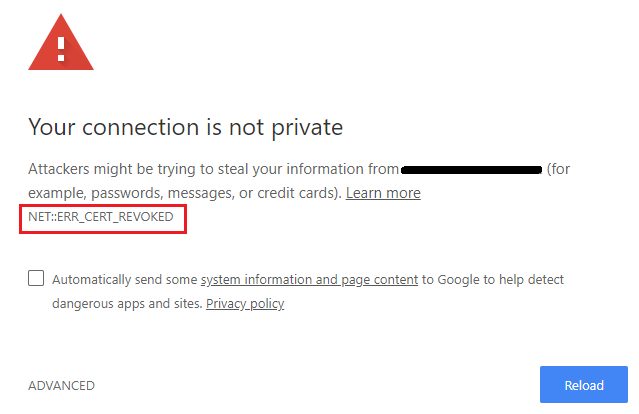
NET::ERR_CERT_REVOKED appears when the certificate authority (CA) has cancelled the certificate of the site. A revoked certificate can no longer be trusted. The reason may be a stolen private key, a mistake in issuing it, or a request by the owner.
Common causes
- The computer clock is wrong. This confuses certificate checks.
- Browser problems: damaged data, an old browser, or extensions that interfere.
- Network settings: DNS issues, firewall rules or a proxy.
- Security software that scans HTTPS traffic.
- The website itself really has a revoked certificate.
Fixes
1. Check the date and time. Set your system to update the time automatically.
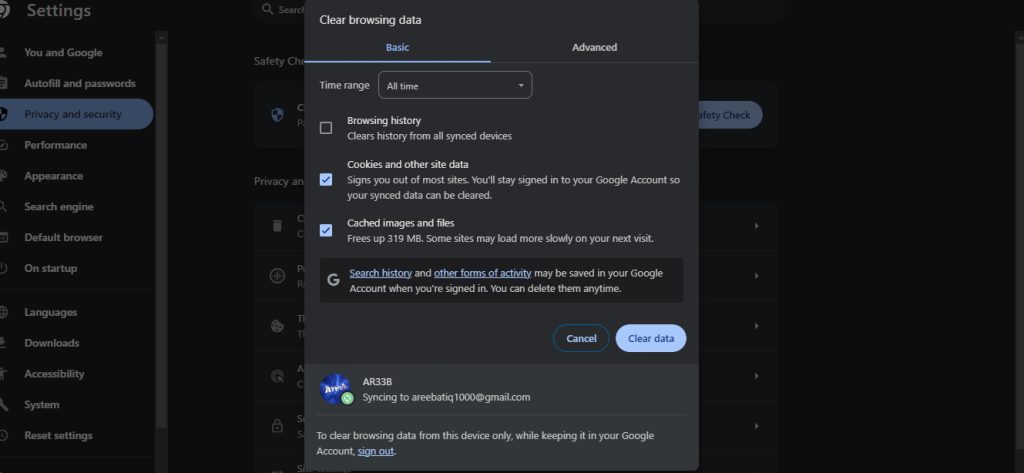
2. Clear the browser cache and cookies
Press Ctrl + Shift + Delete, tick cached files and cookies, and clear them.
3. Turn off extensions
Open chrome://extensions and turn them off, or use a private window where most extensions are off.


4. Flush the DNS cache
Windows:
ipconfig /flushdnsmacOS:
sudo dscacheutil -flushcacheLinux:
systemd-resolve --flush-caches(On newer systems use resolvectl flush-caches.)
5. Turn off antivirus and firewall for a moment to test if they cause it.
If the certificate is really revoked
Then the problem is on the website, not on your computer. Do not click through the warning. If you own the site, request a new certificate from your CA or hosting provider and install it. Hostvento customers can open a support ticket.
Tips
- Use a security tool that handles HTTPS properly.
- Turn on security software again after the test, because it protects you.
- Keep the operating system, browser and security software updated.
Quick recap
- The CA cancelled the site's certificate.
- Fix the clock, the cache, extensions and DNS on your side.
- If it persists, the site owner must get a new certificate.