

What does the error mean?
An SSL certificate is a digital ID card for your website. Browsers only trust ID cards that come from approved companies, called Certificate Authorities (CAs). If the browser cannot check your ID card, it shows a warning like "Certificate not trusted".
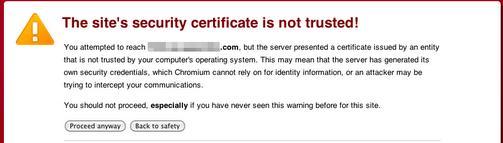
Common causes
- The certificate is self-signed. You made it yourself, so no trusted company vouches for it.
- The CA bundle is missing. This is the chain of files that links your certificate to a trusted company.
- The certificate has expired.
- The certificate is for a different domain name.
- The computer's clock is wrong.
Steps to fix it
- Click the warning in the browser and view the certificate details. Note who issued it, the dates and the names it covers.
- Check your computer's date and time. A wrong clock makes good certificates look expired.
- If the certificate is self-signed, replace it with a free or paid certificate from a trusted company. In cPanel, open SSL/TLS Status and run AutoSSL if your plan has it.
- If it is expired, renew it. Install the new one in cPanel under SSL/TLS then Manage SSL sites.
- If the bundle is missing, open Manage SSL sites. Paste the CA bundle into the Certificate Authority Bundle (CABUNDLE) box and click Update Certificate.
- If the name does not match, get a certificate that covers the exact domain you use, including the
wwwversion. - Clear your browser cache and test again in a private window.
Tip: Online SSL checker tools can show missing bundle problems. Search for "SSL checker" and type in your domain.
Warning: do not tell visitors to click "proceed anyway". It teaches them to ignore real dangers.
If it still fails, send your domain name to support by opening a ticket.
Quick recap
- The error means the browser cannot verify your certificate.
- Check for self-signed, expired, wrong-name or missing-bundle problems.
- Replace or renew the certificate in cPanel.
- Add the CA bundle when it is missing.
- Test in a private window.