

What is the error
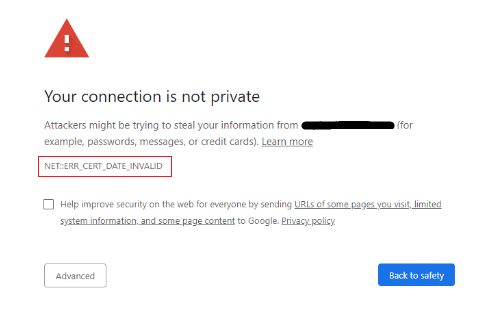
NET::ERR_CERT_DATE_INVALID appears in Chrome and other browsers with the message "Your connection is not private". It means the dates on the site's SSL certificate do not match the date the browser sees. The certificate is expired, or it is not yet valid, or your clock is wrong.
Causes
- The site owner forgot to renew the certificate.
- A new certificate was installed, but your browser still uses a cached old one.
- The site uses a self-signed certificate that the browser does not trust.
- The clock on your computer is wrong.
- Your antivirus or firewall interferes with the certificate.
Fixes for visitors
- Check your computer clock. If the date or time is wrong, a valid certificate looks expired. Turn on automatic date and time.
- Refresh the page. A temporary glitch can cause the warning.
- Clear the browser cache and cookies. Old data may keep an old certificate.
- Update your browser and your operating system. Old systems may not know the new root certificates.
- Try another browser, device or network. If it works there, the problem is on your device.
- Check your antivirus or firewall. Turn off HTTPS scanning for a moment to test.
- Do not click through the warning on sites with logins or payments. If the certificate really expired, wait for the site owner to fix it.
Fixes for site owners
- Check the expiry date. Click the padlock in the browser, or run:
echo | openssl s_client -connect example.com:443 -servername example.com 2>/dev/null | openssl x509 -noout -dates- Renew the certificate. With Let's Encrypt and Certbot:
sudo certbot renew- Install the full chain (the server and intermediate certificates) and restart the web server.
- Turn on auto-renewal (Certbot adds a timer) or AutoSSL in cPanel, and add a reminder for paid certificates.
- Check the server time. A wrong clock on the server can make a new certificate look "not yet valid". Use NTP:
timedatectl set-ntp true. - Clear the CDN cache if you use one.
Quick recap
- Visitors: fix the clock and clear the cache.
- Owners: renew the certificate, install the chain and automate renewals.