

Why look at logs
Server logs record every request. They help you find slow pages, errors, bots and traffic peaks. awk is a fast tool to read and sum up text files like these.
Typical problems you can find in a log:
- Slow responses
- Many 404 or 500 errors
- One IP address that sends too many requests
- Traffic peaks at certain hours
awk basics
awk 'pattern { action }' filenameOur examples use a small log called sample.log. The fields are separated by spaces. Field $1 is the IP address, $7 is the status code and $8 is the response time in this sample:
192.168.1.1 - - [25/Sep/2025:10:00:01] "GET /index.html HTTP/1.1" 200
192.168.1.2 - - [25/Sep/2025:10:00:05] "POST /login HTTP/1.1" 500
192.168.1.1 - - [25/Sep/2025:10:00:10] "GET /about.html HTTP/1.1" 200
192.168.1.3 - - [25/Sep/2025:10:00:15] "GET /contact.html HTTP/1.1" 404
192.168.1.2 - - [25/Sep/2025:10:00:20] "GET /index.html HTTP/1.1" 200
Note: The field numbers depend on your log format. Count the fields of one line before you use the examples. In the standard Apache and Nginx format, the status code is
$9 and the size is $10.Print every line
awk '{print $0}' sample.log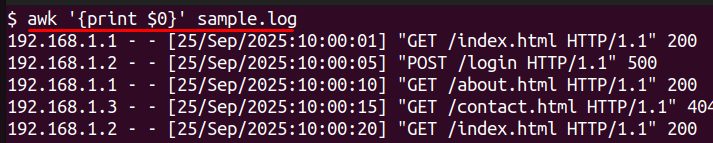
Print the first field (the IP address)
awk '{print $1}' sample.log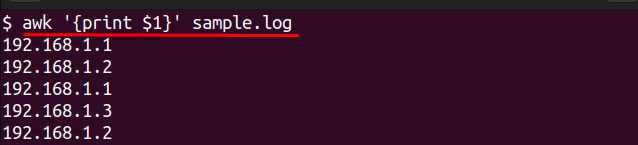
Count the requests of each IP address
awk '{print $1}' sample.log | sort | uniq -c | sort -nr
Find performance problems
Slow requests. If the response time is in field 8 and you want more than 100:
awk '$8 > 100 {print $0}' sample.log
Count the status codes
awk '{print $7}' sample.log | sort | uniq -c | sort -nr
Find the IP addresses that cause the most load
awk '{print $1}' sample.log | sort | uniq -c | sort -nr
Find the peak hours
awk -F'[][]' '{print $2}' sample.log | cut -d: -f1,2 | sort | uniq -c | sort -nr
Calculate the average response time
awk '{sum += $8} END {print "Average Response Time:", sum/NR}' sample.log
More awk techniques
Use a pattern
awk '/GET/ {print $0}' sample.log
Add numbers
awk '{total += $8} END {print "Total Response Time:", total}' sample.log
Count lines that match a condition
awk '$7 == 500 {count++} END {print "500 Errors:", count}' sample.log
Combine with other commands
awk '{print $7}' sample.log | sort | uniq
Quick recap
- Know which field holds what, then print it with
$N. - Use
sort | uniq -c | sort -nrto count. - Use conditions and
ENDblocks to sum up values.