

What is a blacklist?
A blacklist is a list of websites that are marked as unsafe. Search engines and security groups keep such lists. If your site is on one, visitors may see a red warning page. Your email may also land in spam.
A site usually gets listed after a hack or a virus. The owner often does not know it happened.
What does Dropmysite do here?
Dropmysite is a backup service made by another company. Some versions also include a site monitoring tool. It checks your website now and then and tells you if something looks wrong, such as being on a blacklist.
Not every plan includes this. Ask Hostvento support whether Dropmysite and its monitoring are on your plan.
Steps
- Log in to the client area at https://secure.hostvento.com/clientarea.php.
- Open your hosting service and go to cPanel.
- Use the search box in cPanel. Type Dropmysite.
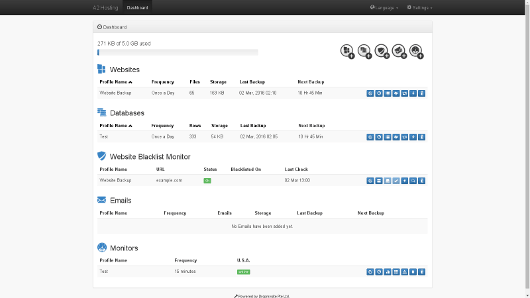
- Open the tool. If it is missing, ask support if it is on your plan.
- Look in the dashboard for a section about website monitoring, security or blacklist status. The name may differ.
- Add your website address if the tool asks for it.
- Turn on alerts, if there is a setting for it. Make sure the alert email address is one you read.
- Check the status. A green or clear status usually means the site is not listed.
- If a warning shows, read it. Note which list your site is on.
If your site is listed
- Do not panic. This can be fixed.
- Change your passwords for cPanel, your website admin and FTP.
- Update your website software and plugins.
- Scan your site for bad files. Remove them or restore a clean backup from before the problem.
- Ask the list owner to review your site once it is clean.
- Open a ticket at https://secure.hostvento.com/submitticket.php if you need help.
Tip: Screen names change over time. Look for words like Monitor, Alerts or Security if you cannot find the exact one.
Quick recap
- A blacklist marks sites that look unsafe.
- Dropmysite may offer monitoring, depending on your plan.
- Turn on alerts and use an email you check.
- If listed, change passwords, clean the site and ask for a review.
- Contact Hostvento support if you need help.