

What is cPanel?
cPanel is a dashboard for your web hosting. You use it to manage files, email accounts, databases and domains. It is like the control room of your website. You click icons instead of typing code.
Before you start
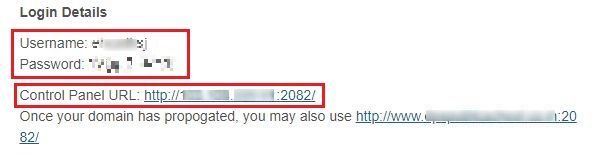
You need your cPanel username and password. Your welcome email from Hostvento contains them. If you cannot find that email, check your spam folder or ask Hostvento support.
Method 1: From the client area
- Go to the Hostvento client area.
- Enter your email address and password. Click Login.
- Click Services, then My Services.
- Click your hosting service.
- Look for a button such as Login to cPanel. Click it.
- cPanel opens in a new tab.
Method 2: Type the address
cPanel normally lives at your domain name followed by a port number. A port is like a numbered door on the server. cPanel uses door 2083 for secure access.
- Open your browser.
- Type your address in this form:
Replacehttps://yourdomain.com:2083yourdomain.comwith your real domain. You can also usehttps://yourdomain.com/cpanel, which usually sends you to the same place. - Enter your cPanel username and password.
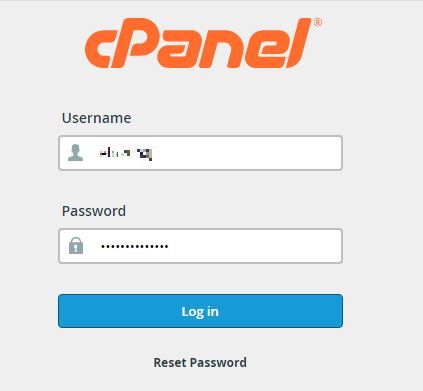
- Click Log in.
Method 3: Use the server IP address
If your domain is not working yet, use the server IP address instead. An IP address is a number that identifies the server. Your welcome email lists it.
https://server-ip-address:2083Your browser may show a warning about the certificate. This is common on an IP address. Continue only if the address is the one from your email.
If you cannot log in
- Check that you typed the username and password correctly. They are case sensitive.
- Make sure Caps Lock is off.
- Try another browser or a private window.
- Too many wrong tries may block your IP address for a while. Wait, or ask support for help.
- If you forgot your password, you can reset it from the client area. Open your hosting service and look for a password change option, or open a ticket.
Quick recap
- cPanel is the dashboard for your hosting.
- Open it from the client area, or at your domain with
:2083. - Your username and password are in your welcome email.
- Ask Hostvento support if you are locked out.