

Why look at visitors?
Visitor numbers tell you if your site is growing. They show which pages people like. They also show if something strange is happening, such as a flood of requests from one place.
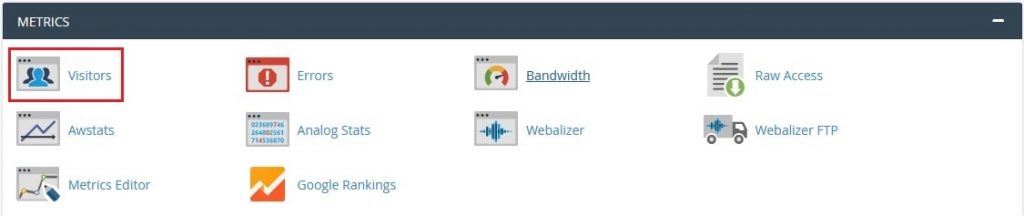
All the tools below are in the Metrics section of cPanel. Which ones you see depends on your plan.
Tool 1: Visitors
- Log in to cPanel.
- In Metrics, click Visitors.
- Choose your domain.
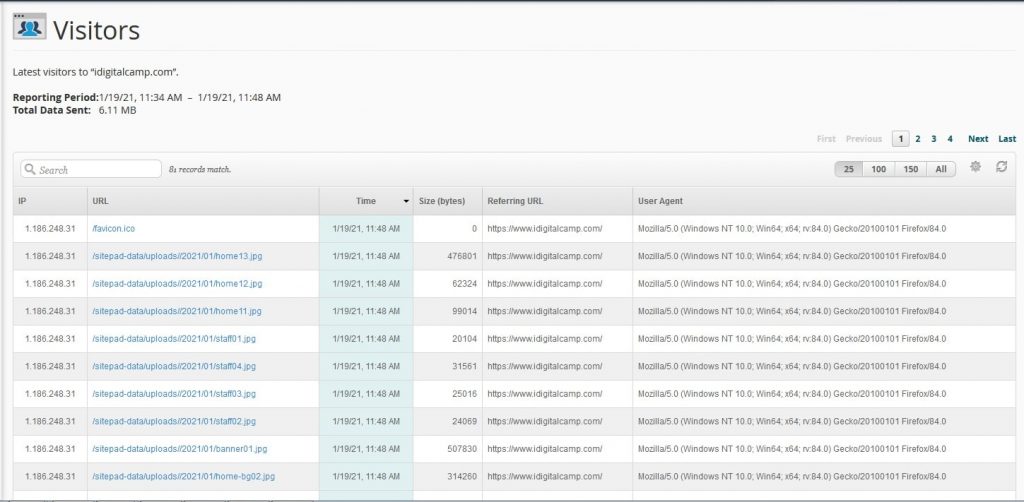
- Read the list of the latest visits. Each row shows the visitor's address, the page, the time and the browser.
This view is a simple list of recent requests.
Tool 2: Awstats
Awstats makes reports with charts and tables. It reads your server log files. A log file is a diary of every request to your site.
- In Metrics, click Awstats.
- Choose your domain and click View.

- Look at the summary at the top. It shows unique visitors, visits, pages and hits. A unique visitor is one person counted once. A hit is any file the server sends, even a small picture.
- Click links on the left to see countries, browsers, search words and the most visited pages.
Tool 3: Webalizer
- In Metrics, click Webalizer.
- Choose the domain.
- Pick a month to see the totals and top pages.
Tool 4: Raw Access
This tool gives you the raw log files.
- In Metrics, click Raw Access.
- Click the log file for your domain to download it.
- Open it in a text editor.
What the numbers mean
| Word | Meaning |
|---|---|
| Hits | Every file the server sends |
| Pages | Real web pages viewed |
| Visits | One person's stay on the site |
| Bandwidth | Amount of data sent to visitors |
Numbers from these tools can include search engine robots. They may not match tools like Google Analytics, which counts real people better.
Tip: Stats update only a few times a day. If you see old numbers, check again later.
Quick recap
- Open the Metrics section in cPanel.
- Use Visitors for recent visits and Awstats for full reports.
- Robots count as visits, so numbers can be higher than real people.
- Reports update a few times a day.