

What do these words mean?
A database is an organised store of information for your site, such as posts, users or orders. MySQL is a popular type of database. A database user is a login that a program uses to open the database. A privilege is a permission, like permission to read, add, change or delete data.
Giving All Privileges means the user can do all of these things on that database. Most websites such as WordPress need this.
Warning: A user with all privileges can delete the whole database. Give it only to apps you trust. Take a backup first.
Steps
- Log in to your cPanel account.

- In the Databases section, open MySQL Databases.
- If you do not have a database yet, type a name under Create New Database and click Create Database.
- If you do not have a user yet, scroll to MySQL Users. Type a username and a strong password. Click Create User.
- Scroll to Add User To Database.
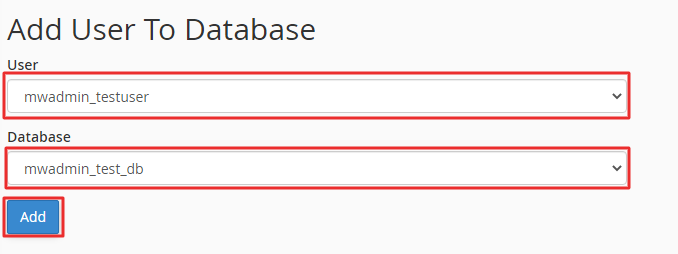
- Pick the user from the User list.
- Pick the database from the Database list.
- Click Add.
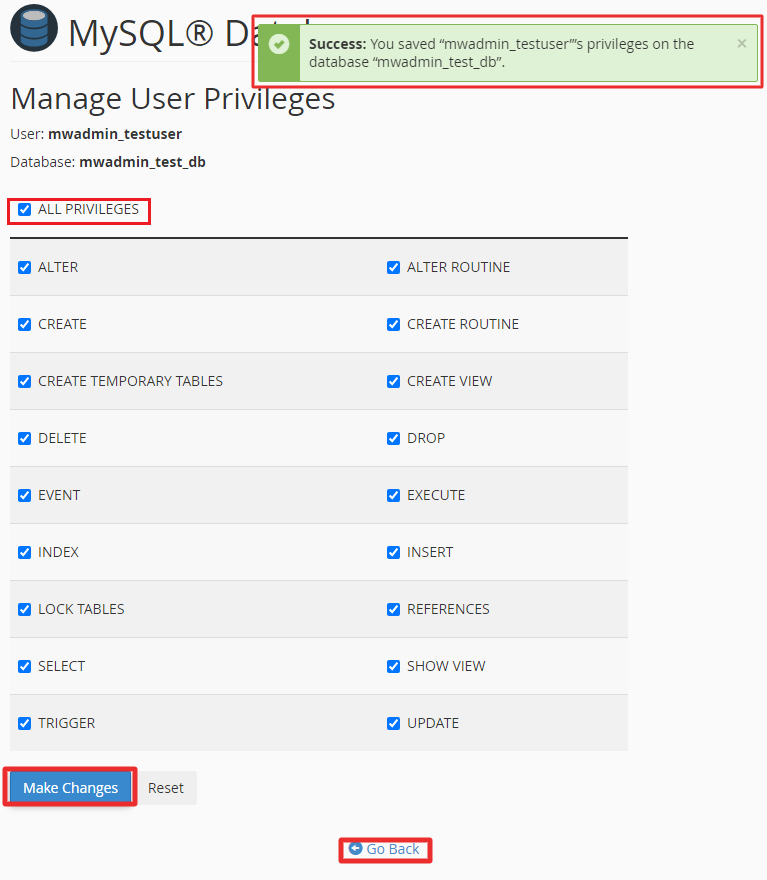
- On the next page, tick the box ALL PRIVILEGES. This ticks every box below it.
- Click Make Changes.
You will see a message that the user now has access to the database.
Fix an existing user
If a user already has the database but with fewer rights, scroll to Current Databases. Click the user name next to the database. This opens the same privilege page. Tick ALL PRIVILEGES and click Make Changes.
Good to know
- cPanel adds your account name before database and user names. For example,
account_shop. Use the full name in your app. - Use one user for each site. Do not share one login everywhere.
- Pick a long password with letters, numbers and symbols.
Tip: cPanel limits users to their own databases. You cannot give rights over other accounts. If you need something special, ask Hostvento support.
Quick recap
- Privileges are permissions for a database user.
- Use MySQL Databases in cPanel.
- Under Add User To Database, pick the user and database, then click Add.

- Tick ALL PRIVILEGES and click Make Changes.
- Back up first and keep passwords strong.