

What is an update channel?
DirectAdmin gets updates, like the apps on your phone. An update channel is the line of releases your server follows. Each channel has a different balance between new features and safety.
Common channels are:
- Stable means well tested releases. This is the safest choice for real websites.
- Current means newer releases with more recent changes.
- Beta means early releases for testing. Do not use it on a live server.
The exact names can differ between versions. Check your own panel.
Before you start
Changing channel can change the panel's behavior. Take a backup or a server snapshot first. A snapshot is a saved copy of the whole server at one moment.
Steps
- Log in to DirectAdmin as admin.

- Open Admin Settings. In some skins it is called Server Manager or Admin Level.
- Look for the Update or Licensing / Updates area. The page may be called Update Channel or Service Monitor.
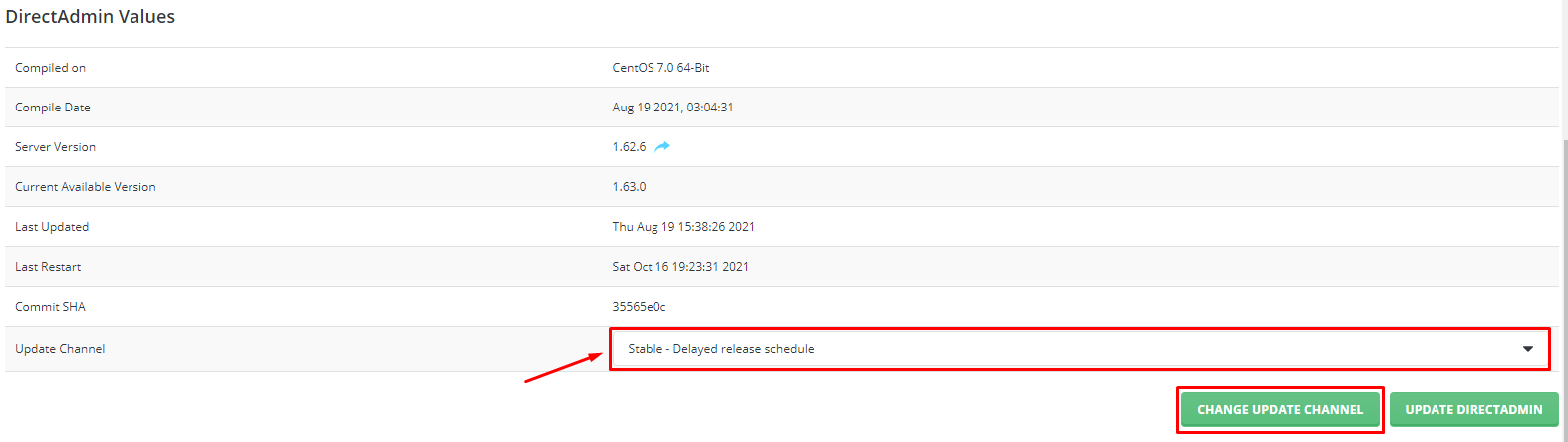
- Find the channel setting.
- Pick the channel you want from the list.
- Click Save.
- Run a check for updates from the same area if the page offers a button for it.
If you do not see the setting, your DirectAdmin version may handle channels in a configuration file. In that case, ask Hostvento support. Do not edit core files by guessing.
After the change
- Wait for any update to finish.
- Open a few websites on the server and check they still load.
- Test email sending.
- If something is broken, restore your snapshot or contact support.
Tip: For a live business site, stay on the stable channel. Move to a newer one only if you need a feature.
Tip: Support can tell you which channel is right for your license and server.
Quick recap
- An update channel decides which DirectAdmin releases you get.
- Stable is safest. Beta is for testing only.
- You need admin access to change it.
- Back up first, then save the new channel.
- Check your websites and email after the update.