

User and reseller: what is the difference?
A user owns one or more websites. A reseller can also create and manage other user accounts. Think of a reseller as a shop manager who can open new shelves for other people. Hosting companies and web designers use reseller accounts to host sites for their clients.
In DirectAdmin there are three levels: admin, reseller and user. The admin sits at the top.
Before you start
You cannot give someone reseller rights from a user login. Only the admin can do it. Make a package for the reseller first. A package is a set of limits, such as disk space and email accounts. Take a backup of the user account before you change it.
Method 1: Create a new reseller account
This is the cleanest way. Move the websites over afterwards.
- Log in to DirectAdmin as admin.
- Open Create Reseller. You may find it under Account Manager.
- Fill in the username, email, domain and password.
- Pick a package, or set the limits by hand.
- Click Create.
Method 2: Convert an existing user
Some DirectAdmin versions let the admin change a user's level directly.
- Log in as admin.
- Open Manage User Accounts or Manage Resellers.
- Click the user you want to change.
- Look for an option to change the account type or level.
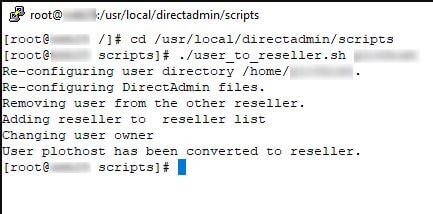
- Set it to reseller and save.
If your version has no such option, use Method 1. Then use the backup and restore feature to move the user's data into the new reseller account. Ask Hostvento support if you need help with this.
After the change
- Log in as the new reseller.
- Check that the Create User and Manage Users options are visible.
- Check that the old websites still work.
- Set the reseller's limits so they do not take all the server's space.
Quick recap
- A reseller can create user accounts. A normal user cannot.
- Only the admin can make a reseller.
- Either create a new reseller, or convert a user if your version allows it.
- Back up the user before you start.
- Test the websites after the change.