

What is a service?
A service is a program that runs all the time on your server and does one job. For example, the web server shows your pages. The mail service sends email. The database service stores data. If one stops, a part of your site stops working. A service is like a worker in a shop. If one worker goes home, that job is not done.
Common services
- httpd or nginx serves your websites.
- exim sends and receives email.
- dovecot lets you read your mailboxes.
- mysqld or mariadb runs the databases.
- named answers DNS questions.
- proftpd or pure-ftpd handles FTP uploads.
- sshd allows safe remote logins.
Steps in the panel
- Log in to DirectAdmin as admin.

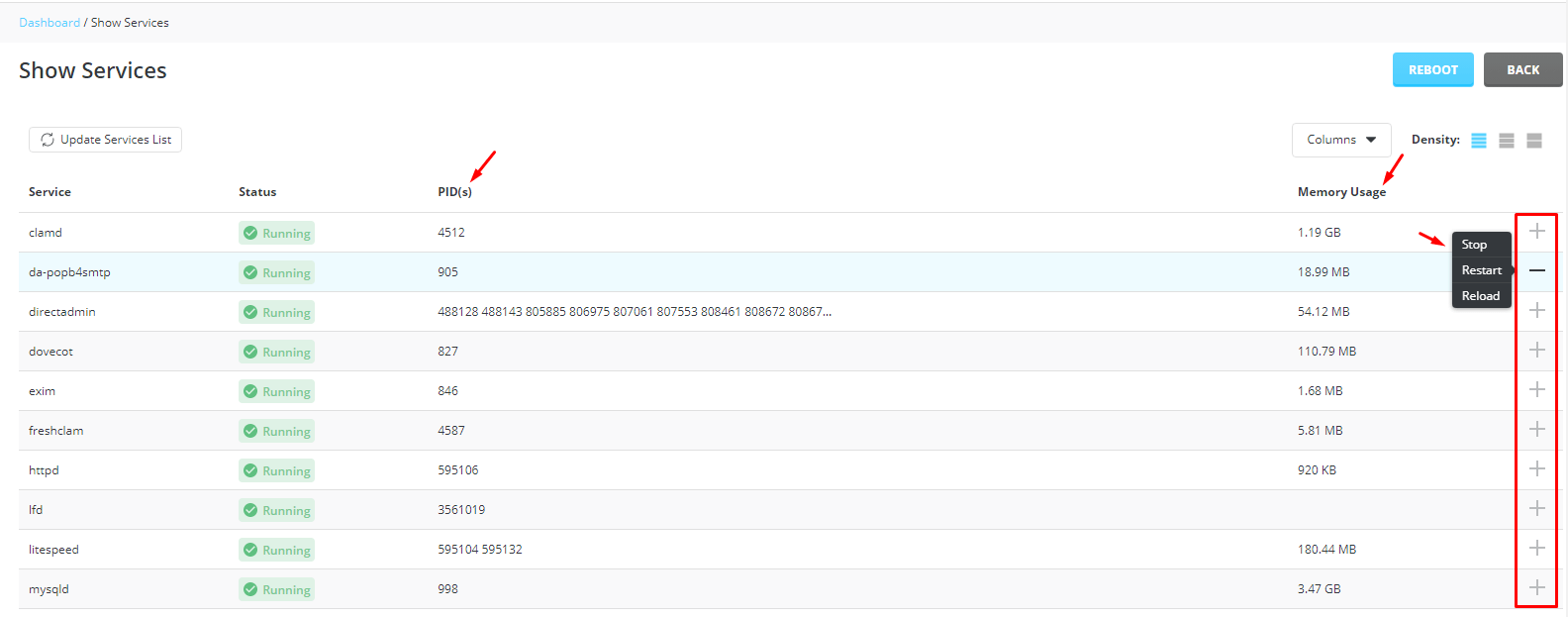
- Open Service Monitor. You may find it under Server Manager or Admin Tools.
- Read the list. A green or "Running" status means the service is on. Red or "Stopped" means it is off.
- Check the memory and load figures on the same page if they are shown.
- If a service is stopped, look for a Start or Restart button.
- Click it once, wait half a minute, and refresh the page.
Steps over SSH
This needs root access. SSH is a way to type commands on a server from far away.
- Connect to your server as root.
- Run this command, with the service name you want:
systemctl status httpdThis shows if httpd is running, and the last lines of its log. Use a different name if you run Nginx or another service.
- To restart a stopped service:
systemctl restart httpdThis stops and starts the service again. Visitors may see a short pause. Restart at a quiet time if you can.
If it will not start
Read the lines shown by the status command. They often say what is wrong, for example a full disk or a wrong setting. Send them to support at https://secure.hostvento.com/submitticket.php.
Quick recap
- A service is a program that does one job on the server.
- Use Service Monitor in DirectAdmin to see which are running.
- Over SSH, use
systemctl statusandsystemctl restart. - Read the error lines if a service will not start.
- Ask support for help.